
How We Turned Data Engineering Runbooks Into Reliable AI Skills
This post is for engineers who want to build AI skills that behave reliably in production. The patterns are drawn from Claude Code skills but the principles apply to any agent skill framework.
Every day, someone on our data engineering team needed to onboard a new table into the warehouse, set up a replication pipeline, or investigate why infrastructure costs had jumped overnight. The process was always the same: follow the runbook, query internal systems to verify the current state, gather the required values, and assemble the CI/CD parameters in exactly the right format. A single wrong field or a value pulled from the wrong database would cause the job to fail with an error that revealed almost nothing about the actual problem. Despite knowing every step, the process remained error-prone, so we wanted to stop doing it by hand. We now run seven skills across our data engineering workflows - each one replacing a process that previously required an engineer to touch four or five internal systems manually.
The first AI skill handled routine workflows reliably. It gathered the right inputs, generated the expected configuration, and turned a multi-step process into a single conversation. But outside the happy path it began making subtle but recurring mistakes: generating configurations for resources that already existed, using values from the wrong data source, or including parameters from unrelated workflows. None of these failures were catastrophic, but they steadily eroded trust. When we investigated, we found the problem wasn't the model - it was the way we had structured the skill. The failures all pointed to the same root cause: we were asking the model to make decisions that should have been encoded into the skill itself.
The model wasn't making irrational decisions - it was making reasonable ones without enough structure. It had to infer which instructions applied, which tools to use, what information it could discover automatically, and when to stop for human confirmation. The seven patterns that follow are the practices we found consistently improved reliability in production - and what we now consider non-negotiable when writing any skill that touches production systems. Engineers familiar with LLM systems will recognise these as applied forms of RAG segmentation, grounding, structured generation, human-in-the-loop checkpoints, and guardrails. What this post adds is the implementation layer - how these concepts translate into a single skill file, and what breaks when you get the details wrong.
Pattern 1: Load One Runbook at a Time
The idea: Split each workflow into its own runbook. Load only the runbook needed for the current request.
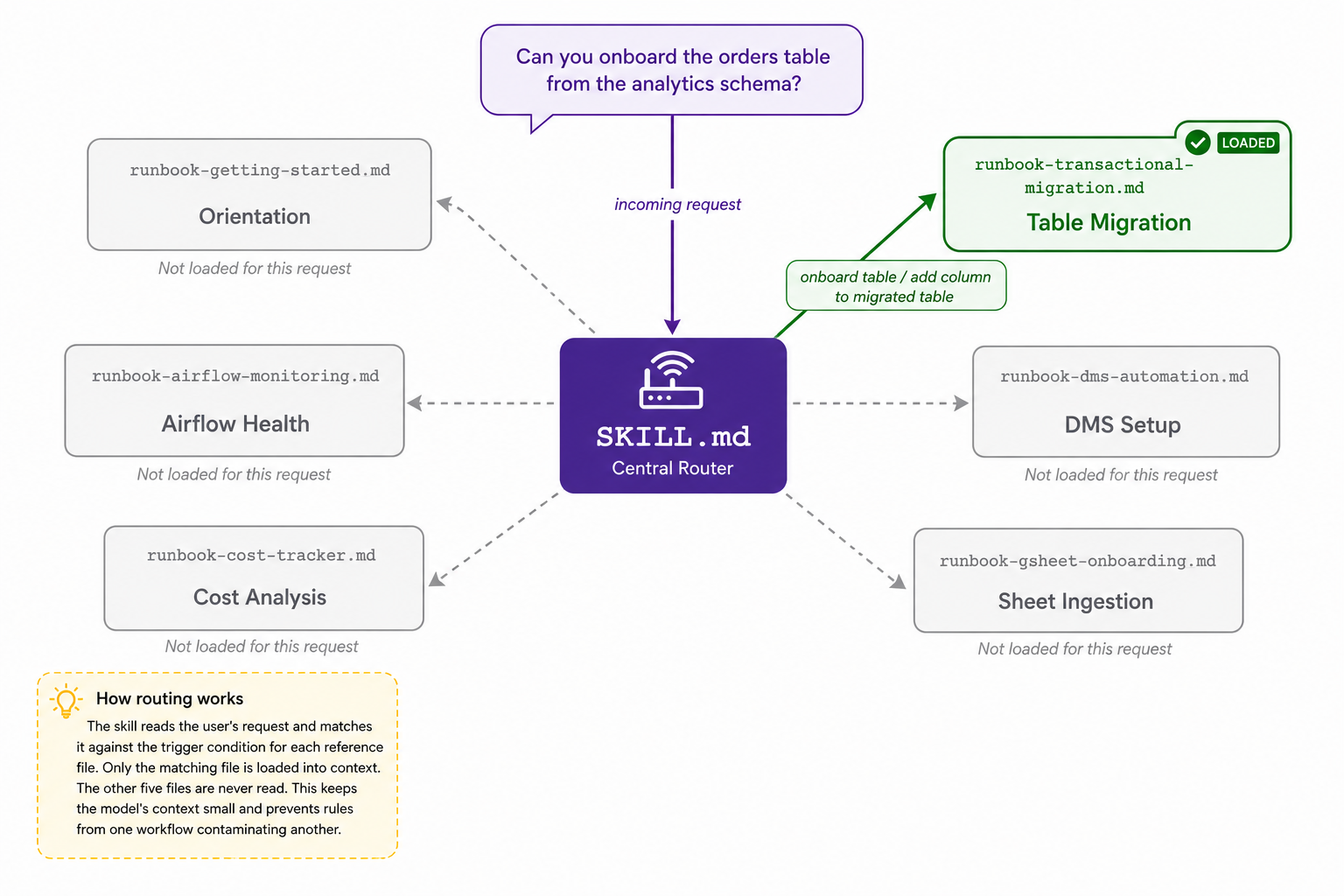
We have a single skill that covers six different automation workflows. Each workflow has its own reference file. The main skill file contains a routing table:
| Reference file | Component | Load when |
|---|---|---|
| runbook-table-migration.md | Table Migration | User asks to onboard a table or add a column to an existing one |
| runbook-replication-setup.md | Replication Setup | User asks to configure a replication service or create a new source endpoint |
| runbook-sheet-ingestion.md | Sheet Ingestion | User asks to onboard an external spreadsheet or update its data range |
| runbook-cost-analysis.md | Cost Analysis | User asks about infrastructure costs or explains a week-over-week change |
| runbook-pipeline-health.md | Pipeline Health | User asks about scheduler health, job success rates, or monitoring alerts |
| runbook-getting-started.md | Orientation | User is new to the repo or asks what each component does |
When someone asks about costs, the skill loads runbook-cost-analysis.md and nothing else. The other five files never enter the context for that request. The model is not juggling six sets of rules - it is executing one.
Rules in one workflow often look similar to rules in another but mean different things. When both files are loaded, the model sometimes conflates them. Loading only one runbook removes the overlap entirely.
The forcing function: The "Load when" column in this table is not documentation. It is a constraint. If you cannot fill it in precisely, the reference material is probably not segmented correctly yet. The act of filling in that column is itself a design review.
This structure also makes the skill easier to maintain. When a workflow changes - a new parameter is added, a table is renamed - you edit exactly one file. The change is isolated and nothing else in the skill is affected. One concern per file means one file per change.
The same principle applies whether you are building skills for cloud infrastructure provisioning, CI/CD configuration, or data pipelines. One concern per file. Load it late. Load it specifically. You can see this pattern applied in the de-automation-tools SKILL.md - the routing table and all six reference runbooks are structured exactly as described here.
Pattern 2: Probe First, Ask Second
The idea: Before surfacing any question to the user, ask: can this be answered by querying a system we already have access to? If yes, query it. Show what you found. Let the user confirm or correct.
In our sheet ingestion workflow, engineers needed to provide a business_unit parameter. The first version asked for it directly - a blank field, waiting for the user to type from memory. The updated version queries the config database first and presents the values already in use. The user selects from a list instead of inventing a value. Typos disappear. Invalid values disappear.
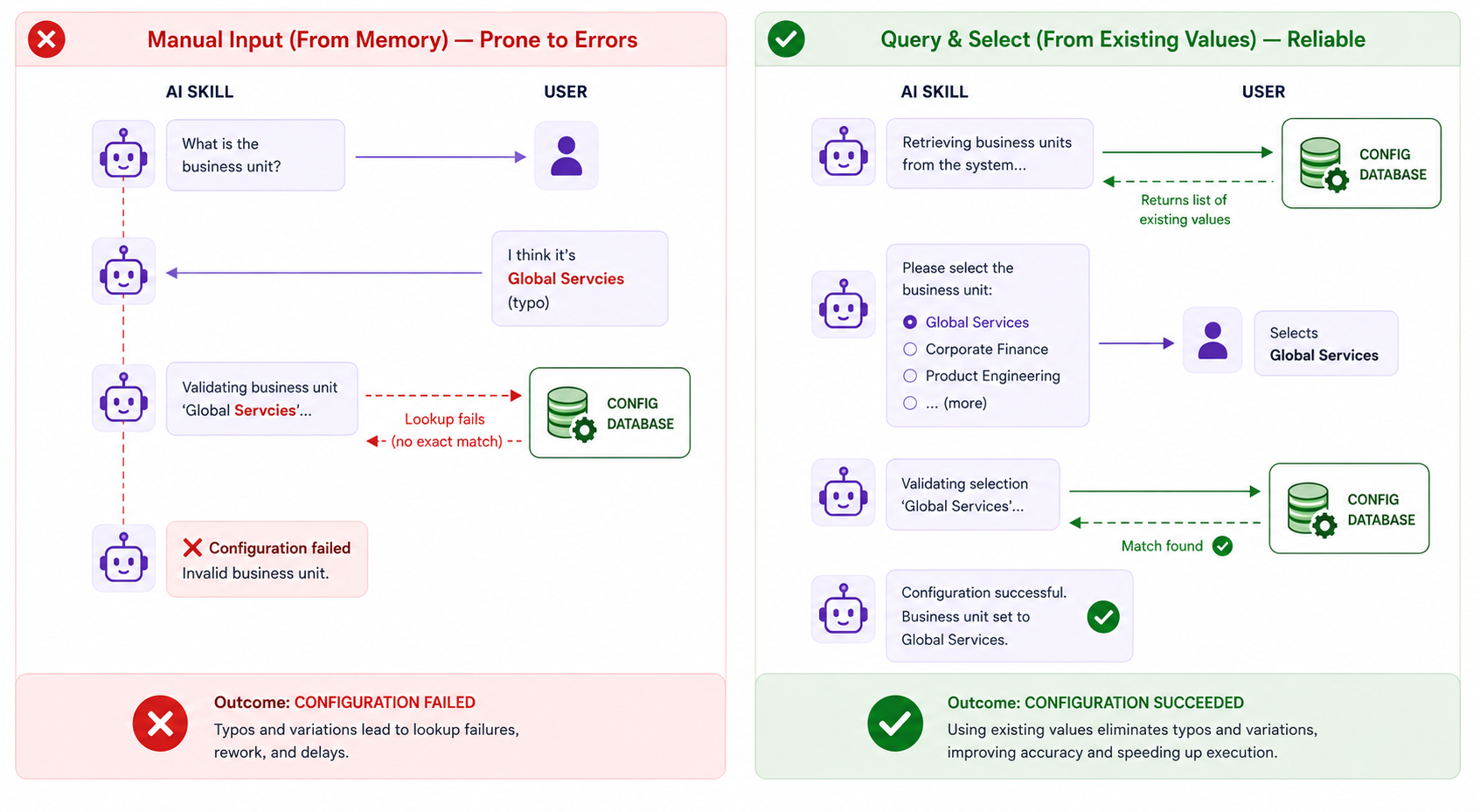
The rule: Every question you ask the user is a failure to look something up. Ask only what genuinely cannot be discovered from an existing system. The references folder shows how each runbook is structured as a separate file with its own scope.
Pattern 3: Map Every Tool Explicitly
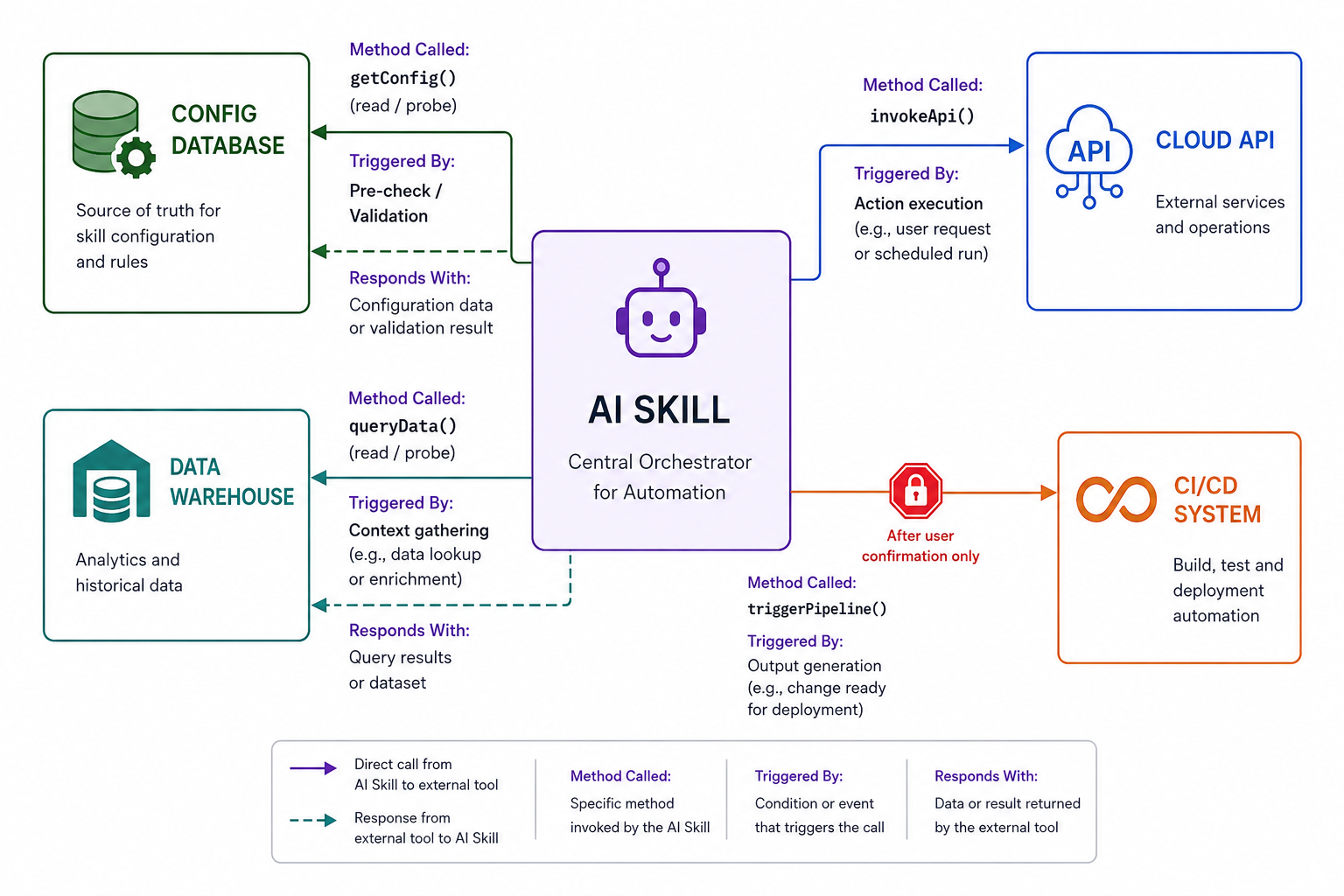
The idea: Humans navigate tools through experience and context. Models navigate tools through explicit constraints. Without a map, a model infers which tool to call based on whatever is most prominent in its context - which means it will occasionally get it wrong. Filling in this map is also a forcing function for the engineer: if a step does not have a clear tool mapped to it, the step is underspecified, and that gap shows up before the skill is ever run.
Here is what the difference looks like in practice:
Without a tool map - the model infers:
Step 3 — Validate that the table does not already exist
Query the database to check if the table is registered.
The model has two database connections available. It picks based on context. Sometimes it queries the config database. Sometimes it queries the warehouse. Both return results. Only one is correct.
With an explicit tool map - the model executes:
Tool: Config DB MCP (config database)
Query: SELECT COUNT(*) FROM pipeline_registry WHERE table_name = '{table_name}'
There is no guesswork. There is one tool, one database, one query. The same step runs the same way every time.
The detail that matters most is: when a skill queries multiple databases, the table must name them explicitly. A mapping that says only "the BI tool" is ambiguous and will eventually cause the model to query the wrong one. Name the specific database. One line in a table prevents an entire class of subtle, hard-to-debug failures.
Pattern 4: Use Exactly Three Gates
The idea: A confirmation gate is a hard stop where the skill shows what it found and what it plans to do - then waits for a human to say yes before proceeding. Not a soft prompt. A structural imperative: NEVER proceed past this point without explicit user confirmation.
Everyone has experienced both failure modes: a tool that fires off actions without asking, and a tool that asks for approval so often you stop reading the prompts. The answer is not more gates or fewer gates, but placing them where human judgment adds the most value. The first version of our skills had a gate at nearly every step. The gates gradually became noise, so we reduced them and found that, for our workflows, three well-placed gates consistently covered the moments where human judgment was genuinely irreplaceable: before any parameters are collected (is this action even valid?), after auto-discovery but before generation (is what the skill found actually correct?), and before production (has staging been verified?). Everything between those three points can run autonomously without meaningful risk.
Gate 1: The Pre-Check Gate
Before the engineer types a single parameter, the skill checks whether the requested action is valid - catching the most common error, trying to configure something that already exists, before any work begins.
Pre-check — ALWAYS verify before generating config

Check if the resource already exists.

If a record is returned → STOP. Inform the user:
━━━━━━━━━━━━━━━━━━━━━━━━━━━━━━━━━━
ALREADY EXISTS
━━━━━━━━━━━━━━━━━━━━━━━━━━━━━━━━━━
Resource: {resource_name}
No action needed — already configured.
━━━━━━━━━━━━━━━━━━━━━━━━━━━━━━━━━━
Gate 2: The Configuration Confirmation Gate
After auto-discovery but before generation, the skill shows what it found and proposes to use - and asks the user to confirm or correct before proceeding. This is where an auto-detected value that looks correct but isn't gets caught before anything is written.
━━━━━━━━━━━━━━━━━━━━━━━━━━━━━━
FOUND — Confirm Update
━━━━━━━━━━━━━━━━━━━━━━━━━━━━━━
Resource     : {resource_id}
Current state: {current_value}
Proposed     : {new_value}

Confirm to proceed.
━━━━━━━━━━━━━━━━━━━━━━━━━━━━━━
Gate 3: The Stage-Before-Production Gate
No skill ever triggers a production job directly. This is also encoded in the hard constraints section, which means it survives even if the output block is later modified.
━━━━━━━━━━━━━━━━━━━━━━━━━━━━━━
Run stage first → verify → then run prod.
━━━━━━━━━━━━━━━━━━━━━━━━━━━━━━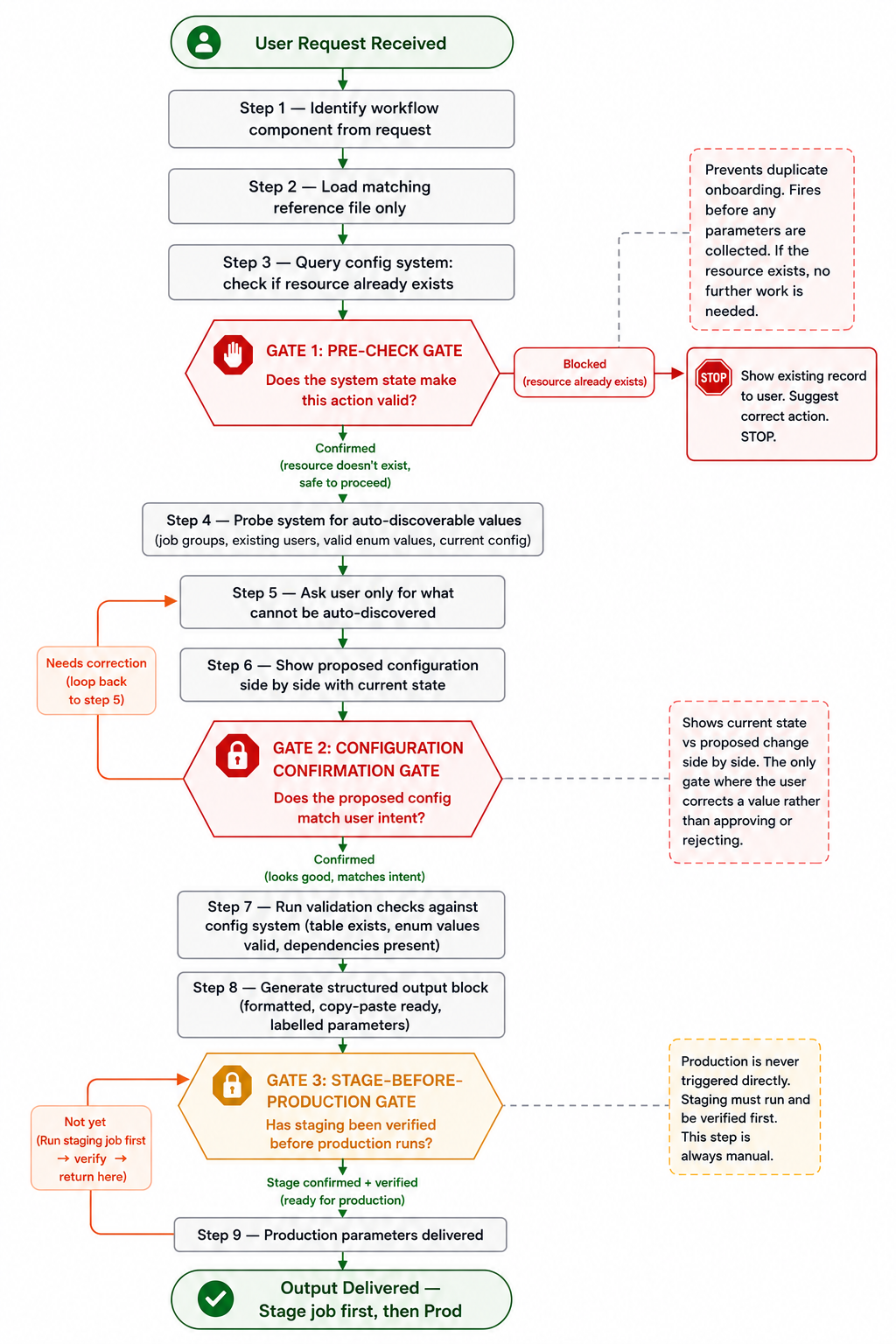
On gate density: The first version of our skills had too many gates. We asked for approval after every step. Users started clicking through without reading. When you reduce to three well-placed stops, each one commands attention. Gates only work when they are rare enough to be taken seriously.
Pattern 5: Write Hard Constraints Adversarially
The idea: Every skill has a short section of non-negotiable constraints that override everything else - written as short imperatives, never as prose paragraphs.
Hard constraints:

- Pre-checks are mandatory - always query the config system
  before generating any output
- new-column-* mode - only 5 params needed; do NOT ask for
  JobGroup, Frequency, PartitionColumn, or IncrementalKey
- Job names are exact strings — use them verbatim, never paraphrase
- Stage before Prod — always remind the user to run stage first
These constraints exist because of specific production failures. During an early run, the skill asked an engineer for a JobGroup parameter while adding a column to an existing table, even though that value was immutable for that workflow. The generated configuration looked valid, the job completed successfully, and no warning was raised - but the parameter had no effect. The incident produced a simple rule: in new-column-* mode, only five parameters are required. The skill no longer asks for values it cannot use.
To write this section, ask one question for each potential constraint: what is the worst thing that happens if the model forgets this? If the answer involves silent errors or a job firing when it should not, it belongs here. Assume the model will always take the most convenient path available. Your job is to make the inconvenient path impossible. The transactional migration runbook has a real key rules section you can use as a reference.
Pattern 6: Make Mode Boundaries Explicit
The idea: Many skills support multiple execution modes - for example, creating a new resource versus updating an existing one. Each mode should define its own required parameters and output template explicitly. Describing the differences in prose is rarely enough because the model fills in missing details using whatever context is most prominent.
Our table migration workflow has three modes, each with a different parameter set and different downstream effects:
| Parameter | new-table | new-column-* | Notes |
|---|---|---|---|
| PartitionColumn | Optional | Not needed | Only for new-table |
| Frequency | Optional | Not needed | Existing tables keep their schedule |
| JobGroup | Optional | Not needed | Existing tables keep their job group |
| IncrementalKey | Optional | Not needed | Existing tables keep their original key |
| Method | Replication modified | Pipeline triggered |
|---|---|---|
| new-table | Yes | Yes |
| new-column-with-full-load | Yes | Yes |
| new-column-without-full-load | No | No |
The explicit per-mode output template is what makes this work. The new-column template does not have a slot for JobGroup - there is nothing to fill in, so the model cannot hallucinate a value for a field that does not exist. An engineer reading the operations table knows exactly what will happen before running anything.
Pattern 7: Define the Output Format With a Real Example
The idea: Every skill produces its final output in a structured, copy-paste-ready block with a consistent format across every execution - not described in prose, but defined with a concrete filled-in example inside the skill file itself.
This is not a cosmetic choice - it is a reliability pattern. Free-form output requires the engineer to parse the response, find the values, and transcribe them manually, and each of those steps is a place where an error can enter. The formatted block eliminates all three.
Every output block in our skills follows the same structure:
━━━━━━━━━━━━━━━━━━━━━━━━━━━━━━━━━━━━━━
CI/CD PARAMETERS — [JobName]
━━━━━━━━━━━━━━━━━━━━━━━━━━━━━━━━━━━━━━

ParameterName:
  value

ParameterName:
  value

━━━━━━━━━━━━━━━━━━━━━━━━━━━━━━━━━━━━━━
Run stage first → verify → then run prod.
━━━━━━━━━━━━━━━━━━━━━━━━━━━━━━━━━━━━━━
Validation findings go in a separate block above - never mixed with the parameters:
━━━━━━━━━━━━━━━━━━━━━━━━━━━━━━━━━
VALIDATION SUMMARY
━━━━━━━━━━━━━━━━━━━━━━━━━━━━━━━━━
✅ resource_name — new, not registered
✅ schema — valid
⚠️  total_fee — confirm decimal precision

━━━━━━━━━━━━━━━━━━━━━━━━━━━━━━━━━
PARAMETERS — copy into CI/CD UI
━━━━━━━━━━━━━━━━━━━━━━━━━━━━━━━━━
[parameter block]
The engineer reads the summary, addresses any warnings, then copies the parameters - two distinct actions, two distinct blocks, no parsing required. Include a complete filled-in example of this format inside the skill file itself, not just a description of it. When the model has seen exactly what the output should look like, format variations across runs disappear. Applying these patterns addressed the failures we encountered in production - what we did not expect were the second-order effects they produced once the skills were running in production.
What Surprised Us After Deploying These Skills
Reducing questions improved accuracy more than adding them. When we stopped asking users to type a business_unit value from memory and replaced it with a list queried from the config database, mismatches dropped to zero. Before the change, roughly two in five onboarding runs required a correction because of a mistyped or outdated value - a trailing space or a capitalisation difference. After the change, zero. We had removed one question and eliminated an entire category of failure. It produced more reliable output than any prompt change we had tried.
Users trusted the skill more when it showed its reasoning. The earliest version handed you a final output block with no visible intermediate steps, and users were hesitant to use it on high-stakes workflows - tables with downstream dependencies, pipelines used by multiple teams. When we added the configuration confirmation gate - showing what the skill had discovered before asking for approval - engineers stopped second-guessing the output and started treating it as a starting point to confirm rather than a black box to distrust. They were not asking for more control. They were asking for visibility into how the skill had arrived at its answer.
These observations reinforced what the patterns had already shown us. Before shipping any skill, we now run through six questions - and if we cannot answer all of them, the skill is not ready.
The Six Questions to Ask Before You Ship Any Skill
1. What is the minimum I need to ask the user?
   Everything else should be probed from existing systems.

2. What reference material does each step actually need?
   Everything else should not be in context at that step.

3. Which external tool handles which step, via which method?
   Write the table. If you can't fill it in precisely, the step is underspecified.

4. Where do I need the user's eyes before the skill acts?
   Those are your gates. Keep them rare. Keep them specific.

5. What goes wrong if the model forgets one thing?
   That thing goes in the hard constraints section.

6. What does the output look like, exactly?
   Define the template. Include a real example. Don't leave it to discretion.
If you can answer all six before you ship, you are writing a production skill. If you cannot, you are writing a prompt and hoping.
Skills Built Using These Patterns
These patterns are drawn from the design decisions that consistently improved reliability across our production skills.
de-automation-tools
The skill this article is built around. It combines five workflows under a single routing layer and serves as a reference implementation of all seven patterns described in this post.
create-datamart-table
Automates onboarding new warehouse tables by introspecting source schemas, validating pipeline configuration, mapping source types to warehouse types, and generating CI/CD-ready parameters.
add-datamart-column
Handles adding new columns to existing warehouse tables, including duplicate-column checks, schema validation, type mapping, and generation of downstream automation payloads in the exact format required by the target system.
All three skills share the same architectural principles: explicit routing, querying before asking, confirmation gates, hard constraints, and structured outputs.
If you are building skills for data engineering workflows, you can explore the source code on GitHub and adapt the patterns to your own environment.
References
Join us
Scalability, reliability, and maintainability are the three pillars that govern what we build at Halodoc Tech. We are actively looking for engineers at all levels and if solving hard problems with challenging requirements is your forte, please reach out to us with your resumé at careers.india@halodoc.com.
About Halodoc
Halodoc is the number one all-around healthcare application in Indonesia. Our mission is to simplify and deliver quality healthcare across Indonesia, from Sabang to Merauke.
Since 2016, Halodoc has been improving health literacy in Indonesia by providing user-friendly healthcare communication, education, and information (KIE). In parallel, our ecosystem has expanded to offer a range of services that facilitate convenient access to healthcare, starting with Homecare by Halodoc as a preventive care feature that allows users to conduct health tests privately and securely from the comfort of their homes; My Insurance, which allows users to access the benefits of cashless outpatient services in a more seamless way; Chat with Doctor, which allows users to consult with over 20,000 licensed physicians via chat, video or voice call; and Health Store features that allow users to purchase medicines, supplements and various health products from our network of over 4,900 trusted partner pharmacies. To deliver holistic health solutions in a fully digital way, Halodoc offers Digital Clinic services including Haloskin, a trusted dermatology care platform guided by experienced dermatologists.
We are proud to be trusted by global and regional investors, including the Bill & Melinda Gates Foundation, Singtel, UOB Ventures, Allianz, GoJek, Astra, Temasek, and many more. With over USD 100 million raised to date, including our recent Series D, our team is committed to building the best personalized healthcare solutions — and we remain steadfast in our journey to simplify healthcare for all Indonesians.