

One Platform for Every AI Agent at Halodoc
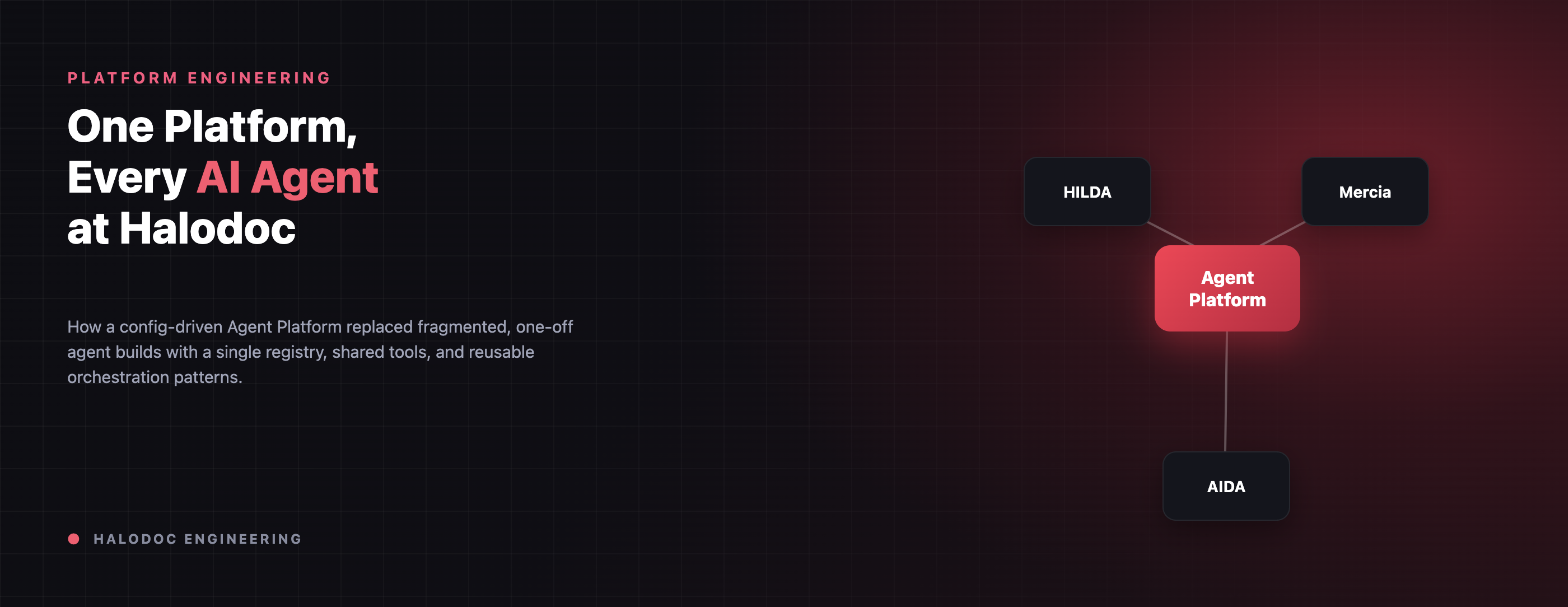
Over the past year, several teams at Halodoc started building AI agents. By an AI agent, we mean a program that reads a user's message, works out what needs to happen, and calls our internal services to get it done. A few of the ones we've built this year:
- HILDA (Halodoc InteLligent Digital Assistant): helps users navigate Halodoc's healthcare platform and services.
- Mercia: helps B2B pharmacy merchants manage stock and orders.
- AIDA: runs pre-assessment checks before a teleconsultation and answers treatment-package questions afterward, powering services like Haloskin and Halofit.
Each of these is useful on its own, and all of them run in production today. But built independently, by different teams who created their own architecture, guardrails, infrastructure and inconsistent approaches to monitor agent quality. This post details how Halodoc's Platform Engineering team consolidated that sprawl and built a unified AI Agent platform that all teams could use and manage in a consistent way.
Why we needed one platform
As more teams started building agents, the same problems kept showing up. Every team wrote its own loop for calling the AI model and its tools, its own orchestration (the logic that decides which step runs next), and its own rules for what the agent was allowed to do. Agents also lived inside individual services, so when two teams needed the same capability, like recommending a doctor, each one built it separately. And if a team wanted two agents to work together, it had to invent a way to do that from scratch.
Some duplication is normal in a growing company. What worried us was that we were duplicating safety checks. Every agent that recommends doctors needs code that stops the AI from suggesting a doctor who doesn't exist. With that check written separately in multiple places, we had multiple chances to get it slightly wrong. In healthcare, getting it wrong means a patient receives the wrong answer.
So we set ourselves three goals. We wanted one place to govern every agent. We wanted one layer that works across our custom agents and frameworks like LangGraph, so a team could pick what fits and switch later without starting over. And we wanted common ways of combining agents to be ready to use with a few lines of configuration.
It was a modest bet. We gave it one to two engineers and roughly three months to get a shared agent registry running in production.
What is the Agent Platform?
From the outside, the Agent Platform looks simple. A user's message goes in, and a structured, checked response comes out. HILDA in the customer app and Mercia in the merchant portal are very different products, but on the platform both follow the same three rules:
- The AI model decides what to do. It picks which tools to use based on the message. We never hardcode the user's intent.
- Tools do the actual work. A tool is a piece of regular Python code, like finding doctors or adding an item to a cart. Every recommendation, data change and business rule lives in a tool.
- Agents don't remember anything themselves. Everything about a conversation is stored in a session, outside the agent, so any server can handle any request.
That third rule is why Mercia can run a long, multi-step ordering conversation while HILDA answers a quick doctor question, both on the same infrastructure. Neither agent needs its own special servers or its own scaling setup.
One registry, multiple frameworks
We support two ways to build an agent. Both are loaded when the service starts, by a single component we call the UnifiedAgentRegistry:
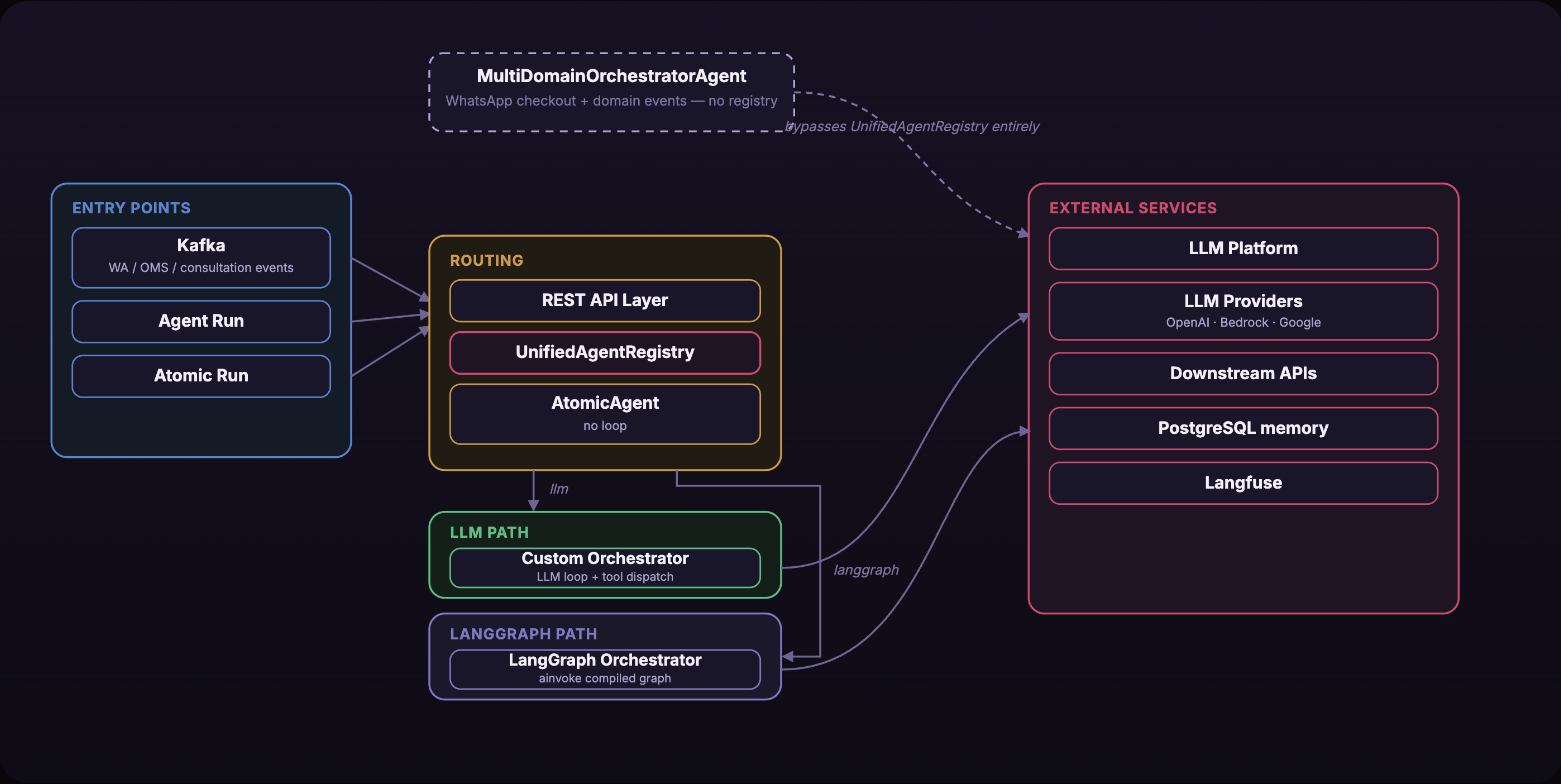
- Custom agents run a simple loop. They ask the AI model, run the tools it asks for, send the results back, and repeat until there's an answer.
- LangGraph agents follow a graph that's defined ahead of time. That makes it possible to run several agents in parallel, have one agent hand work to specialists, and remember a conversation across requests.
The code that calls an agent doesn't need to know which kind it is. At startup, the registry reads a single catalog file, agents.yaml, and prepares every agent listed there. After that, calling any agent takes the same single line, registry.get(service_type).run(request).
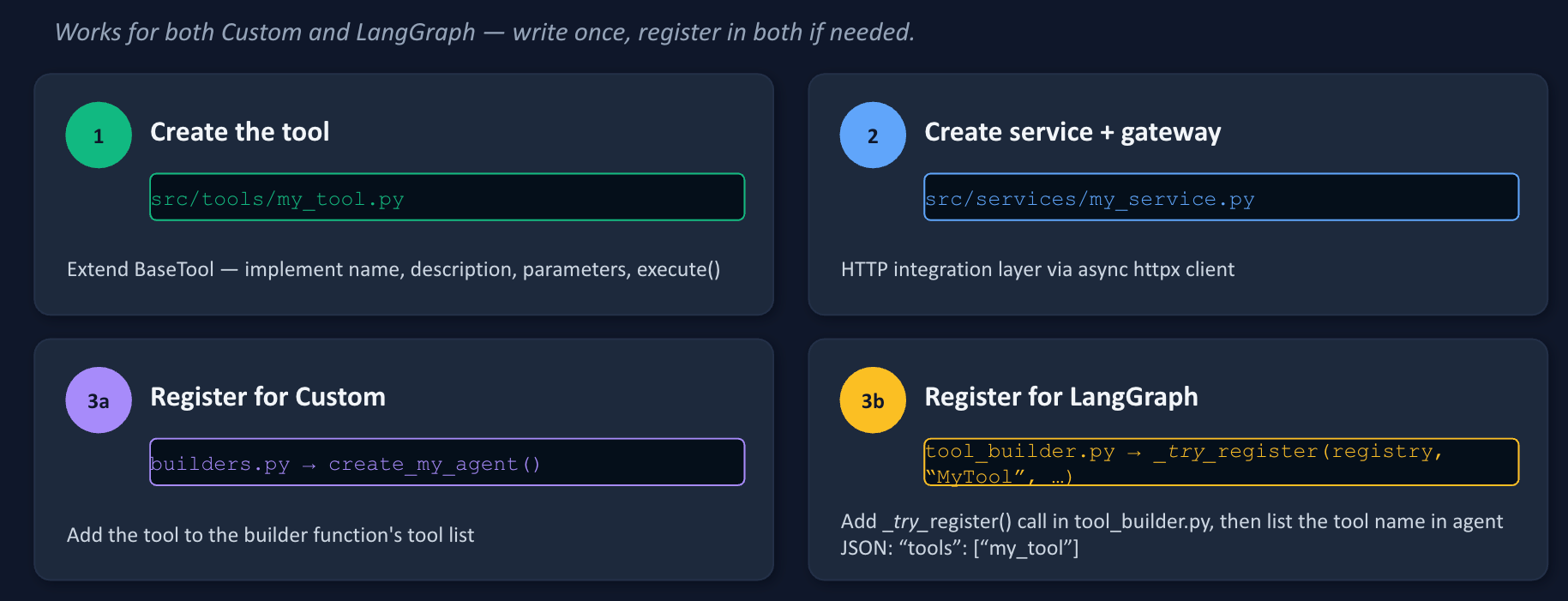
Both kinds of agent share the same tools. Each tool defines four things: a name the AI model can refer to, a one-line description of when to use it, the inputs it accepts (as a JSON Schema), and an execute() method that does the real work.
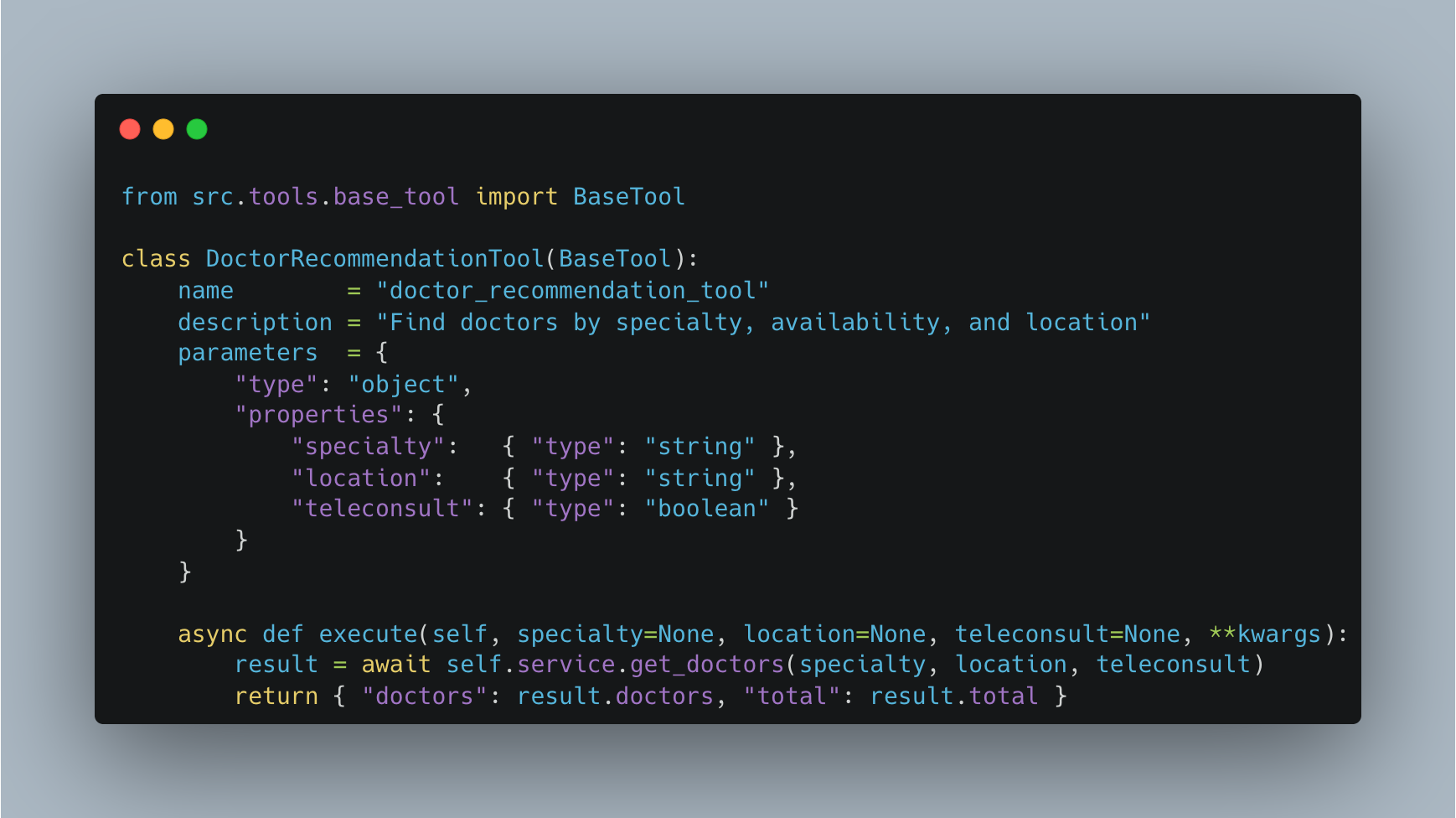
We write a tool once and register it with a custom agent, a LangGraph agent, or both.
What it can do today
Every custom agent on the platform gets a set of features without extra work. The AI model reads the user's message and works out what they want, so we don't need keyword matching or hand-built classifiers. One message can lead to several tool calls, with the model deciding what to call next. Every recommendation is also checked against what the tools actually returned, which we explain further below.
Sessions carry information from one message to the next. In WhatsApp checkout, for example, the cart, address and order ID stay in the session even though the agent itself remembers nothing. Business rules like the BPOM prescription check live in code, so a model update can't bypass them. We can also run A/B tests and route different users to different AI providers or prompts through configuration, without a deploy.
Why we chose LangGraph
LangGraph wasn't our only option. We compared eight frameworks (OpenAI Agents SDK, Google's ADK, Strands, CrewAI, AutoGen, LangChain, LangGraph and DeepAgents) against the same seven criteria, and LangGraph came out on top. Three of those criteria decided it for us, marked below:
| Criterion | LangGraph |
|---|---|
| Works with any AI provider | Uses each provider's own SDK directly, with no translation layer in between |
| Native Bedrock support (decisive) | Talks to Amazon Bedrock's Converse API directly, through langchain-aws |
| Structured output | Each agent's input and output is checked against a schema (Pydantic or JSON Schema) |
| Control over the order of steps (decisive) | The graph is fixed ahead of time, so the AI model never changes the order of steps |
| Running agents in order or in parallel | Supports both, and can wait for every parallel agent to finish before moving on |
| Handing work between agents through config | Built in |
| Production maturity (decisive) | Generally available with a stable v1.0 API, and already used in production by companies of a similar size |
The biggest thing LangGraph gave us is a set of ways to combine agents that a simple loop can't handle. Each agent picks one with a single setting, execution_mode, in its JSON config:
- single: one AI model with its own tools.
- sequential: one agent's output becomes the next agent's input.
- parallel: several agents run at the same time, and a final step combines their answers.
- hierarchical: a supervisor works out what the user wants and hands the request to one specialist agent.
Switching between these patterns doesn't need any new Python code. LangGraph also lets us create an agent from configuration alone. On top of that, it made it possible to remember conversations across sessions and to check every response before it goes out. We cover both next.
Remembering conversations
Because our agents remember nothing between requests, any server can pick up any request. The downside is that something else has to remember the conversation. The usual fix is to make the caller send the whole conversation history with every request. That works, but requests get bigger as the conversation gets longer, and every caller has to keep track of the history itself.
LangGraph has a feature called a checkpointer that solves this. Each conversation gets an ID, a thread_id, and after every turn the conversation's state is saved to PostgreSQL under that ID. The caller only sends the thread_id. Whichever server receives the request loads the saved state and carries on. We already handle session state the same way; the checkpointer applies that idea to conversation history.
Checking every answer before it goes out
An AI model can be wrong and sound completely sure of itself, and that's hard to spot just by reading its answer. In healthcare, a made-up doctor recommendation breaks the user's trust. So we never treat the model's output as final. Before a response goes back to the caller, we check it against what the tools actually returned. Anything that didn't come from a tool is removed, and the model is asked to try again.
This means the check doesn't depend on the model behaving well on any given day. A provider update, a new model version or a prompt change can't quietly remove it, because the check lives in regular code between the model and the user. It runs on every response.
Example: a supervisor and three specialists
To prove the pattern works end to end, we built a reference setup using the same product, doctor and homecare tools our other agents already use. Each specialist agent is just a few lines of JSON:
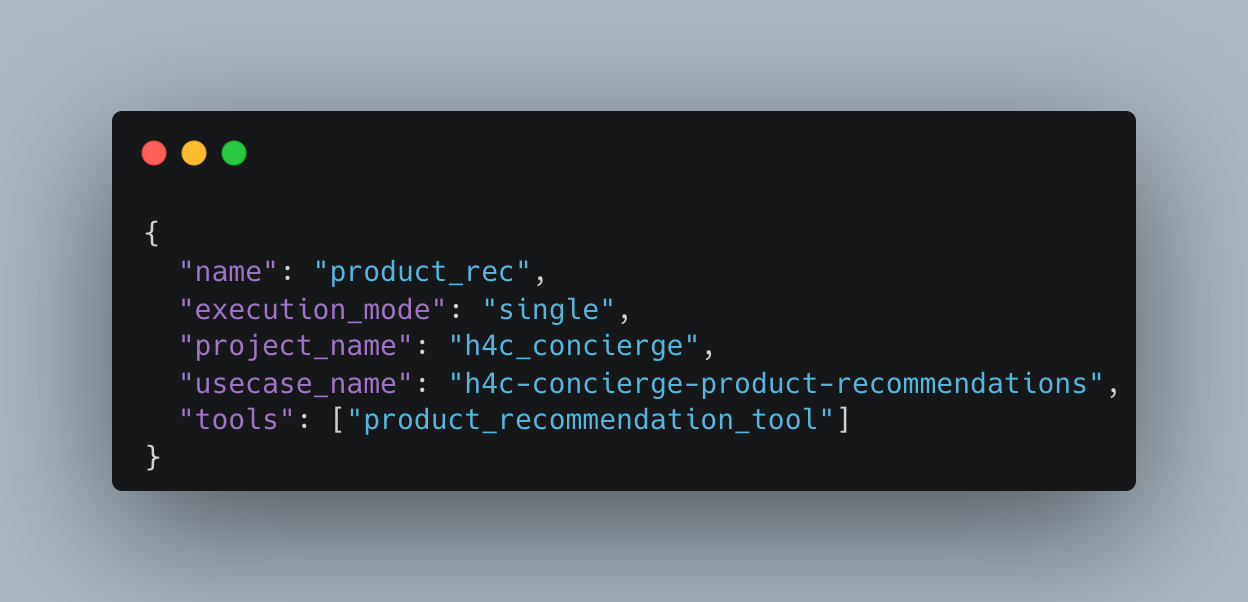
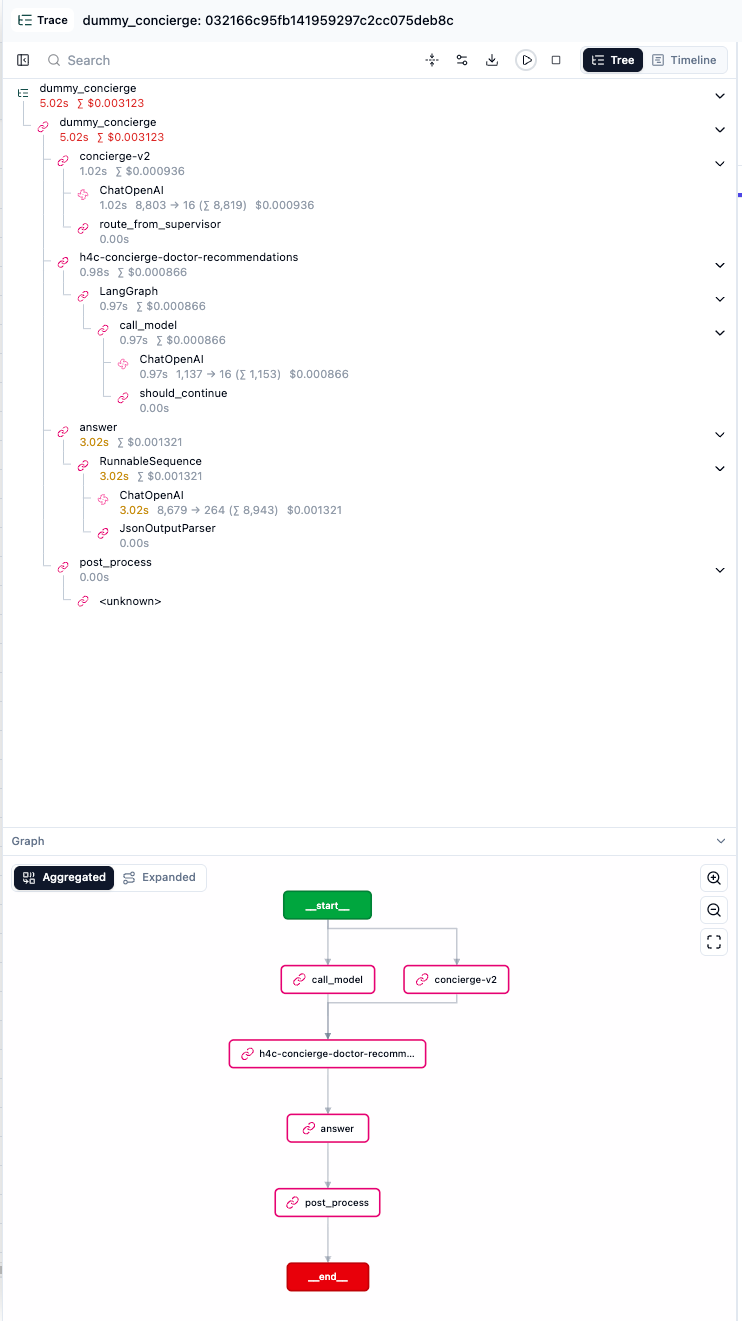
The supervisor has its own config listing the specialists and the kinds of requests each one handles. Say a patient writes "Cari dokter spesialis jantung yang bisa teleconsult" (find a cardiologist available for teleconsultation). The supervisor works out that this is a doctor recommendation request and hands it to doctor_rec. The specialist calls its own tool and returns a structured result. The supervisor writes the reply, and the validator checks it before it's sent.
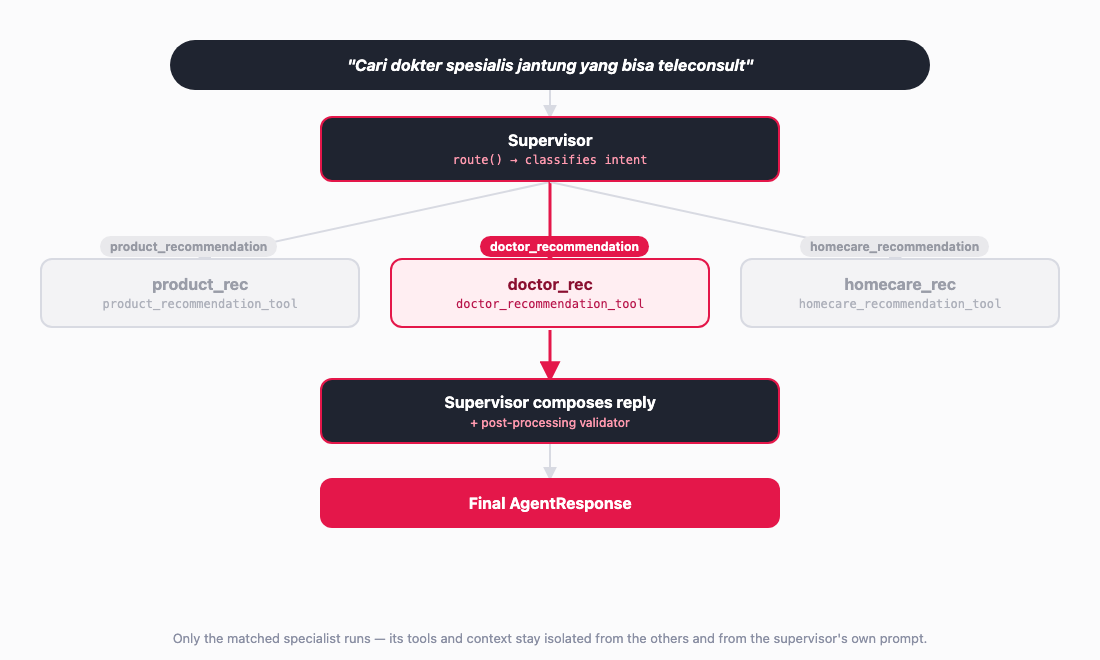
The supervisor never sees a specialist's tools, only its result. That keeps each specialist's context small, and adding a new specialty just means adding a new JSON file.
Adding a new tool or agent
The real test of whether we'd fixed the fragmentation problem is how much work it takes to add something new. A new tool is one Python class, registered wherever it's needed:
A new agent takes only a little more:
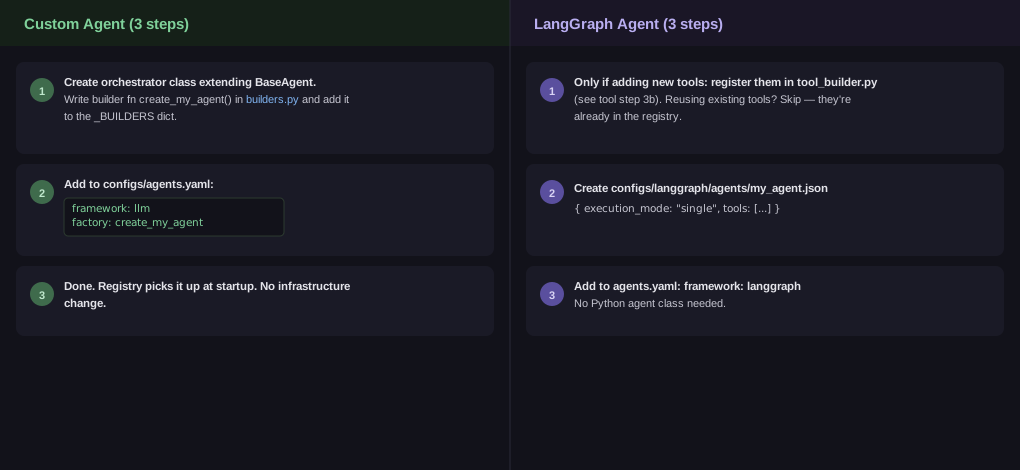
- Custom agent: an orchestrator class, a builder function in
builders.py, and one entry inagents.yamlwith frameworkllm. - LangGraph agent: if it reuses existing tools, a config file under
configs/langgraph/agents/(ororchestrations/for multi-agent patterns) and one entry inagents.yamlwith frameworklanggraph. No Python class needed.
So a new agent, or a new way of combining agents, is now a configuration change. Nobody has to build a separate service for it.
What this saved us
Take the supervisor example above, where every tool already existed because other agents had built it. Here's roughly how long an agent like that takes to ship:
| Agent type | Time to ship | What the team had to build |
|---|---|---|
| Custom agent, before the platform | ~1-2 weeks | The orchestration, the loop that calls the AI model and its tools, the checks against made-up answers, and session handling, all built and reviewed separately by each team |
| Custom agent, on the platform | ~1-2 weeks | A new orchestrator class, its tools and its business logic. The registry, the tool format and the answer checks come from the platform |
| LangGraph agent, on the platform | ~3 days | One JSON config and one line in agents.yaml, reusing an existing pattern and existing tools. No new Python class |
A brand-new custom agent still needs its own orchestration code, so it takes about as long as it always did. The difference is that the team no longer rebuilds the safety checks along the way. The bigger change is with LangGraph, where work that used to take one to two weeks now takes about three days of configuration. The savings also keep adding up after launch:
| What changes | Before the platform | On the platform today |
|---|---|---|
| Adding a capability that already has a tool | Rebuilt from scratch by each team, even when another team had already solved it | Written once. A new agent uses the existing tool, so there's no extra copy to maintain |
| Checking an AI answer before it reaches the user | No shared check. Each custom agent had its own filter and retry logic, if it checked at all | One shared validator, used by every LangGraph pattern |
What we've learned after three months
It has been about three months since we moved our agents onto the platform. Here's what we noticed.
Many more people now work on our agents. In the four months before the move, 14 engineers worked on the codebase our agents lived in before. In the three months after, 24 engineers contributed to the Agent Platform, and 18 of them had never touched the old one. We think part of the reason is that adding a tool no longer requires understanding how a whole agent is put together.
Most of that work made our existing agents more capable. The number of production agents only went from nine to ten, with a hospital chat agent for our insurance product as the new one. The number of tools, meanwhile, grew from about 60 to more than 100. Our WhatsApp checkout agent, for example, can now handle doctor consultations as well as medicine orders, and our customer support agents can hand a conversation to a live agent or create a support ticket. Each of those was a set of new tools plugged into an agent that already existed.
Sharing code also changed how fixes work. When we found that agents could fail if Sphere, the internal service we use to call AI models, returned a response in an unexpected format, one fix protected every production agent at once.
What's next
Bringing orchestration into one place was the first step. Next, we're giving five more common needs the same treatment, so every agent gets them without each team building them again:
- Role-based access control (RBAC): permissions per role, enforced in code. This replaces today's single shared token that can call anything, and hides sensitive fields depending on who is asking.
- Context compaction: in long conversations, older messages are summarized in the background, so the prompt, and the time and cost that come with it, stay proportional to what's happening now.
- Human-in-the-loop (HITL): actions that are hard to undo, like taking a payment, are proposed first and wait for a person to confirm. The values are checked again on the server.
- Response streaming: the answer reaches the user while the model is still writing it, with the same tools and safety checks.
- Async job processing: requests that take too long for a single round trip are accepted right away, saved as jobs, and retried automatically if something fails.
Each of these will be something an existing agent can simply switch on.
Conclusion
The diagram below puts the whole platform in one picture. It shows where a request comes in, which orchestrator handles it, and where each capability, shipped or coming soon, fits in.
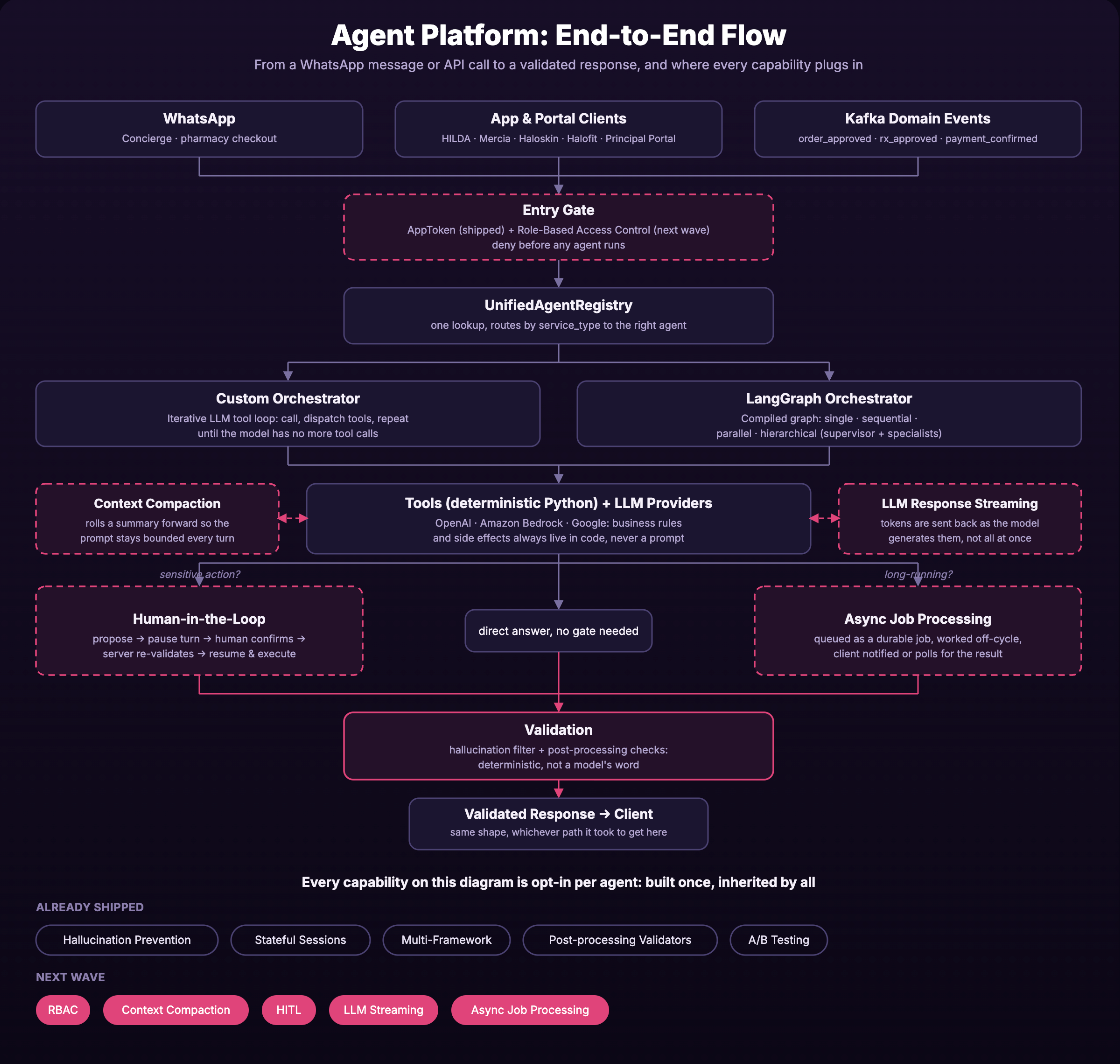
Most of the Agent Platform deals with the unglamorous parts, like session state, safety checks and calling tools. Those are now written once and shared across every team. From the outside, an agent still works the way it always did. A user's message goes in, and a checked, structured answer comes out. What changed is everything underneath. We think giving every team the same foundation, so nobody has to build it again, is the fastest way for us to ship more AI agents safely.
Join us
Scalability, reliability, and maintainability are the three pillars that govern what we build at Halodoc Tech. We are actively looking for engineers at all levels, and if solving hard problems with challenging requirements is your forte, please reach out to us with your resume at careers.india@halodoc.com.
About Halodoc
Halodoc is the number one all-around healthcare application in Indonesia. Our mission is to simplify and deliver quality healthcare across Indonesia, from Sabang to Merauke.
Since 2016, Halodoc has been improving health literacy in Indonesia by providing user-friendly healthcare communication, education, and information (KIE). In parallel, our ecosystem has expanded to offer a range of services that facilitate convenient access to healthcare, starting with Homecare by Halodoc as a preventive care feature that allows users to conduct health tests privately and securely from the comfort of their homes; My Insurance, which will enable users to access the benefits of cashless outpatient services more seamlessly; Chat with Doctor, which allows users to consult with over 20,000 licensed physicians via chat, video or voice call; and Health Store features that allow users to purchase medicines, supplements and various health products from our network of over 4,900 trusted partner pharmacies. To deliver holistic health solutions in a fully digital way, Halodoc offers Digital Clinic services, including Haloskin, a trusted dermatology care platform guided by experienced dermatologists.
We are proud to be trusted by global and regional investors, including the Bill & Melinda Gates Foundation, Singtel, UOB Ventures, Allianz, GoJek, Astra, Temasek, and many more. With over USD 100 million raised to date, including our recent Series D, our team is committed to building the best personalized healthcare solutions, and we remain steadfast in our journey to simplify healthcare for all Indonesians.