

Angular 20 Migration: SSR Challenges & Resolutions with Vite, ESM, and Express 5
At Halodoc, our public website halodoc.com has long relied on Angular with Server-Side Rendering (SSR) — powered by a custom Express server — to deliver fast, SEO-friendly pages to millions of users. When Angular 20 arrived, it brought a wave of architectural changes that touched nearly every layer of our stack: the build tooling, the module system, the server runtime, and even how routes are extracted at compile time.
This blog is not a generic upgrade checklist. It is a real-world blueprint drawn directly from the challenges we hit, the errors we debugged, and the resolutions we shipped — so that the next team migrating a complex SSR monolith doesn't have to start from scratch.
At a Glance — What Changed & What Broke
Here's the summary of what changed and what we had to fix across the stack:
| Challenge Area | What Changed | Key Fix |
|---|---|---|
| Build System | Webpack → Vite + esbuild | New @angular/build:application builder |
| Module Format | CommonJS → ESM (.mjs) | PM2, Docker, server.ts all need ESM |
| SSR Engine | CommonEngine → AngularNodeAppEngine | New handle() + context bootstrap pattern |
| Express Version | Express 4 → Express 5 | Route syntax rewrite, async middleware |
| RxJS Version | 6.x → 7.8+ | ESM-compatible exports map required |
| Package Exports | Deep imports allowed | Strict exports enforcement — use public API |
| Dev Server Flags | --disable-host-check removed | Vite security model replaces webpack flags |
| TypeScript | Lenient 3rd-party types | Strict checks — custom .d.ts files needed |
Architecture Overview — Before & After
Before Angular 20, our SSR pipeline looked like this: a Webpack-bundled Angular app producing dist/server/main.js (CommonJS), consumed by an Express 4 server using CommonEngine to render HTML. PM2 managed the process in cluster mode.
After Angular 20, the entire output and runtime contract changed. Here are both architectures side-by-side:
Before Migration — Angular 17/19 SSR Architecture
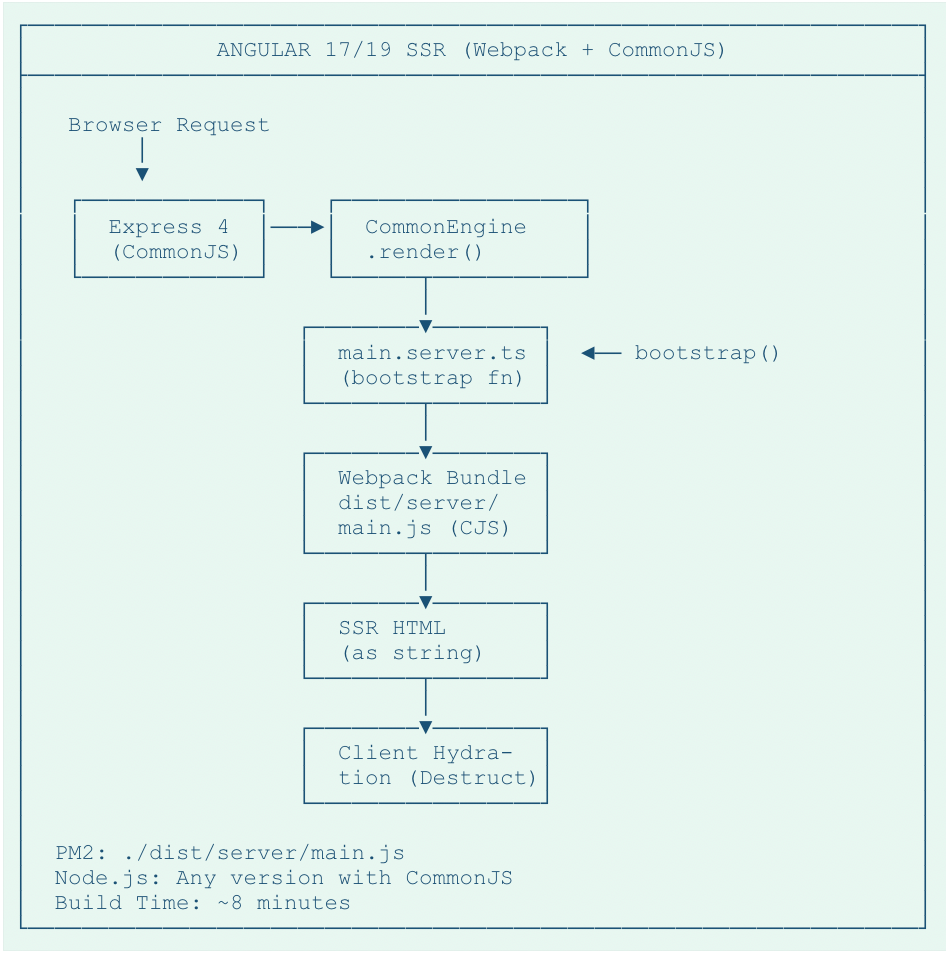
Figure 1: Angular 17/19 SSR architecture using Webpack, CommonJS, Express 4, and CommonEngine render() API.
After Migration — Angular 20 SSR Architecture
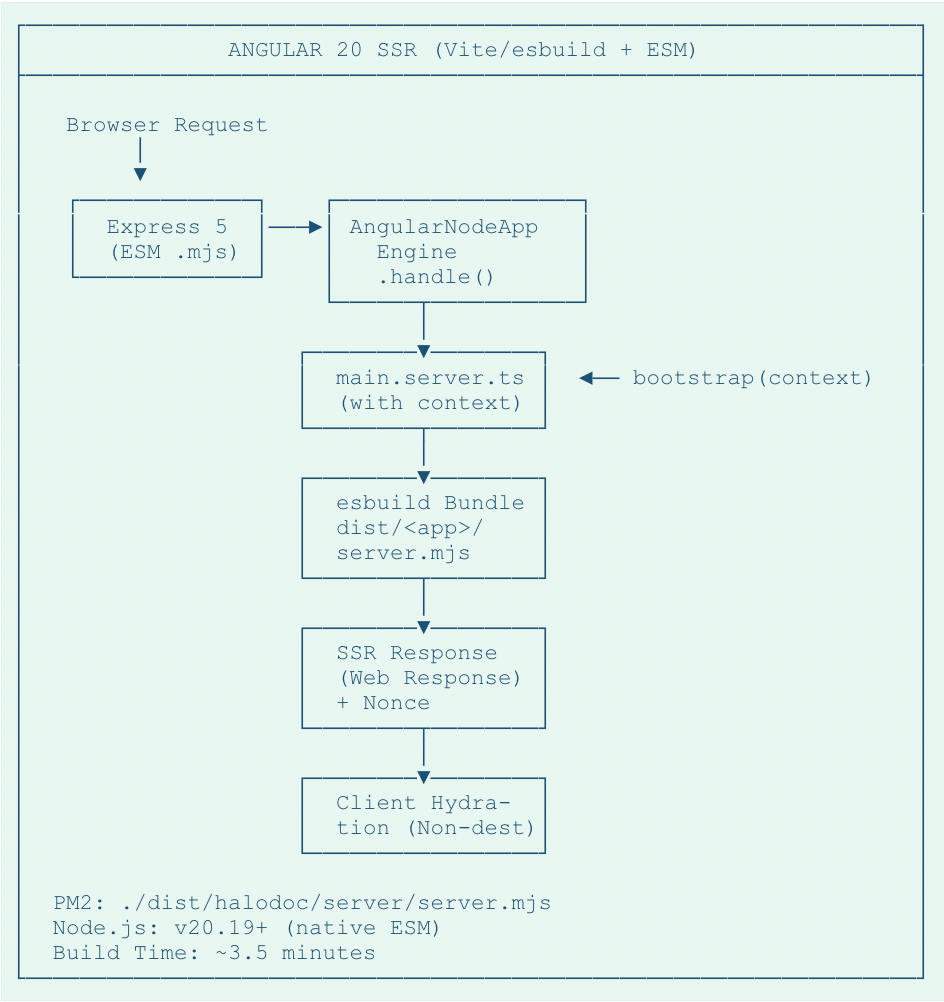
Figure 2: Updated Angular 20 SSR architecture using Express 5, AngularNodeAppEngine, and an ESM server entrypoint with per-request context.
Key shift: The server entry point is now an ESM .mjs file, consumed by Express 5 via AngularNodeAppEngine, with per-request context injection.
Build Performance Gains
The migration to esbuild brought measurable improvements to our CI/CD pipeline:
- Production builds: Reduced from ~8 minutes (Webpack) to ~3.5 minutes (esbuild) — a 56% improvement
- Development startup: Cold start went from ~45 seconds to ~12 seconds with Vite's on-demand compilation
- Incremental rebuilds: Hot Module Replacement (HMR) now completes in < 200ms vs. 2-4 seconds previously
1. Build System Migration — Webpack → Vite + esbuild
What exactly changed?
- Dev server now runs on Vite instead of webpack-dev-server — different HMR behavior, faster cold starts, but incompatible flags like --disable-host-check were removed
- Bundle output: dist/server/main.js (CJS) became dist/<app>/server/server.mjs (ESM)
- Dependency resolution: esbuild resolves all imports eagerly — even conditional or dynamic ones
- HMR (Hot Module Replacement) mechanism is now Vite-native.
angular.json — Builder Configuration
{
  "projects": {
    "halodoc": {
      "architect": {
        "build": {
          "builder": "@angular/build:application",   // ← new builder
          "options": {
            "outputPath": { "base": "dist" },
            "browser": "src/main.ts",
            "externalDependencies": ["canvas", "path2d"]  // ← esbuild exclusions
          }
        }
      }
    }
  }
}
A
2. SSR Configuration — The Missing Metadata Problem
What was missing?
- No ssr block under build options
- No server entry pointing to main.server.ts
- No outputMode: "server" declaration
- No serve-ssr target for local dev
Complete SSR Configuration (angular.json)
"configurations": {
  "production": {
    "server": "src/main.server.ts",       // Angular server bootstrap
    "ssr": {
      "entry": "src/server.ts"            // Express server entry
    },
    "outputMode": "server",               // SSR mode (not static prerender)
    "prerender": {
      "discoverRoutes": false             // manual route control
    }
  },
  "development-ssr": {
    "server": "src/main.server.ts",
    "ssr": { "entry": "src/server.ts" },
    "outputMode": "server",
    "optimization": false,
    "sourceMap": true
  }
}
SSR configuration in ngular application builder
Key Configuration Pointers
- server → Angular's server bootstrap (main.server.ts)
- ssr.entry → Your Express server file (server.ts)
- outputMode: "server" → Enables live SSR rendering
- prerender.discoverRoutes: false → Disables auto route scanning
3. CommonJS → ESM — The Ripple Effect
Before vs After — Server Entry Point
| Before | After |
|---|---|
|
|
PM2 Configuration (ecosystem.prod.config.js)
module.exports = {
  apps: [{
    name: 'public-web-app',
    script: './dist/public-web-app/server/server.mjs',  // ← .mjs, not .js
    interpreter: 'node',
    node_args: '--max-old-space-size=12000',
    instances: 2,
    exec_mode: 'cluster'
  }]
};
PM2 configuration
4. Express 4 → Express 5 — Route Syntax Rewrite
Route Pattern Changes
| Before (Express 4 / Old) | After (Express 5 / New) |
|---|---|
|
|
Key Express 5 Pattern Changes
- Use /{*path} for catch-all routes instead of *.
- Use :param(*) for wildcard parameter captures instead of **.
- Prefer server.use() middleware over catch-all routes for SSR handlers.
- Top-level await is now supported in middleware functions.
Why it matters: Getting these patterns wrong can silently break redirects or cause 404s only on specific wildcards, so we tested route matching extensively in staging before rollout.
5. Dependency Compatibility — Three Gotchas
Most of our time here went into small, scattered fixes rather than one big blocker—this is where having good logs and TypeScript errors mattered.
5a. ngx-slick-carousel — Missing jQuery Types
Resolution: Install @types/jquery explicitly and ensure it is included in tsconfig types, so ngx-slick-carousel can compile correctly under Angular 20's stricter type setup.
5b. Canvas Native Module — esbuild Eagerness
Resolution: Tell esbuild to externalize these modules:
// angular.json → build → options
"externalDependencies": ["canvas", "path2d"]
// This tells esbuild to skip bundling these entirely.
5c. RxJS 6.x → 7.8+ — ESM Directory Imports
Resolution: Upgrade to RxJS 7.8+ (Angular 20's minimum). Additionally, some deprecated operators were removed — audit your catchError, switchMap usage during the upgrade.
6. CommonEngine → AngularNodeAppEngine
Before vs After — SSR Engine Usage
| Before | After |
|---|---|
|
|
Note: Because handle() returns a Web Response object, we can now apply cross-cutting concerns (like CSP nonce injection and header manipulation) in one place before sending the response.
main.server.ts — Bootstrap Context
// Angular 20: bootstrap now receives context
const bootstrap = (context?: any) =>
  bootstrapApplication(AppComponent, config, context);

export default bootstrap;

// This is how AngularNodeAppEngine passes
// REQUEST, RESPONSE providers per request.
Bootstrap context in main.server.ts
7. Strict Package Export Enforcement
The Problem
// Breaks in Angular 20
import { MessageComponent }
  from '@halodoc/package/lib/Package/components/message-component';

// Correct way — import from package root
import { MessageComponent } from '@halodoc/Package';
Importing package which are not declared in package export
Fix — Expose via public-api.ts
// libs/package/public-api.ts
export * from './lib/package/components/message-component;
Declaring package via public-api.ts
Then rebuild and republish the library. All consuming apps switch to the root import. This also improves tree-shaking and maintains proper versioning contracts.
8. Route Extraction Errors — Catch Block Strictness
Before vs After — Error Handling
| Before | After |
|---|---|
|
|
Rule of Thumb
- Always declare an error variable in catch
- Type it as Error or unknown — never omit
- Use the variable (even just for logging) — the optimizer checks for it
9. CSP Nonce Injection — Security Under SSR
Because our public site is internet-facing and uses a strict Content Security Policy (CSP), preserving nonce-based script tags across the new SSR stack was non-negotiable.
With the new AngularNodeAppEngine returning a Web Response object instead of a raw HTML string, we had to adjust how we inject nonces into <script> tags for Content Security Policy.
Nonce Injection Utility
function injectNonceIntoScripts(html: string, nonce: string): string {
  if (!nonce) return html;
  return html.replace(
    /<script(?![^>]*\snonce=)/gi,
    '<script nonce="' + nonce + '"'
  );
}

// In the SSR middleware:
const response = await angularApp.handle(req, ctx);
if (response?.headers.get('content-type')?.includes('text/html')) {
  const html = await response.text();
  res.status(response.status).send(
    injectNonceIntoScripts(html, res.locals.nonce)
  );
}
Injecting nonce in Server.ts
Verification: We verified nonce injection manually in staging by inspecting rendered HTML and checking that all inline script tags carried the expected nonce and passed our CSP headers.
10. Prometheus Monitoring — Singleton Registry Pattern
The Fix — Global Singleton
// src/server/prometheus.ts
const globalRef: any = globalThis;

if (!globalRef.__PROMETHEUS_REGISTRY__) {
  globalRef.__PROMETHEUS_REGISTRY__ = new Registry();
}

export function setupPrometheus(app: Express) {
  if (globalRef.__PROMETHEUS_INITIALIZED__) return;
  globalRef.__PROMETHEUS_INITIALIZED__ = true;

  app.use(promMid({
    metricsPath: '/metrics_prom',
    registry: globalRef.__PROMETHEUS_REGISTRY__,
    prefix: 'website_',
    collectDefaultMetrics: false
  }));
}
Prometheus registry as global singleton
This pattern is safe to call multiple times — only the first invocation registers metrics. Works with HMR, cluster mode, and SSR re-imports.
11. Missing Type Declarations — Custom .d.ts Files
Resolution — Declare Modules
// src/types/express-prometheus-middleware.d.ts
declare module 'express-prometheus-middleware' {
  const promMid: any;
  export default promMid;
}

// src/types/xhr2.d.ts
declare module 'xhr2' {
  const xhr2: any;
  export default xhr2;
}
Ensure tsconfig.app.json includes "**/*.ts" so these declaration files are picked up. Long-term: seek packages with proper types or contribute to DefinitelyTyped.
12. Removed Dev Server Flags
Updated package.json Scripts
{
  "scripts": {
    "start":     "ng serve --host 0.0.0.0 --port=4000",
    "dev":       "ng serve --configuration=development --port=4000",
    "dev:ssr":   "ng serve --configuration=development-ssr --port=4000"
  }
}
Scripts for development
Migration Quick-Reference Checklist
Use this as a starting point for your own Angular 20 SSR migration runbook; adjust steps to match your CI/CD and hosting model.
Build & Runtime
- Run ng update @angular/core@20 @angular/cli@20 — then do not trust it blindly. Manually verify angular.json.
- Add the full SSR block (server, ssr.entry, outputMode) for every environment.
- Switch PM2, Docker, and CI scripts to .mjs paths.
- Migrate Express 4 → 5. Rewrite route patterns.
- Replace CommonEngine with AngularNodeAppEngine.
Dependencies & Types
- Upgrade RxJS to 7.8+. Fix removed operators.
- Audit all deep package imports. Export via public-api.ts.
- Add externalDependencies for native modules (canvas, path2d, etc.).
Security & Dev Experience
- Fix every catch block — add a typed error variable.
- Remove --disable-host-check from all npm scripts.
- Run the full test suite. Check CSP nonce injection manually.
Conclusion
Angular 20's migration is not just a version bump; it is an architectural shift. The move to esbuild, ESM-first module resolution, and the new AngularNodeAppEngine touches the build pipeline, the server runtime, and the deployment config simultaneously.
The good news: once you understand the why behind each change, the fixes are straightforward. This blog is meant to be your shortcut through the debugging we already did. Bookmark the checklist, adapt the code examples to your project, and consider adding similar guardrails (CSP nonces, Prometheus patterns, strict typings) early in your migration instead of treating them as afterthoughts.
References
- Angular 20 Update Guide — Step-by-step migration instructions and breaking changes documentation
- New Application Builder Documentation — Details on the new @angular/build:application builder
- Express 5 Migration Guide — Official guidance for breaking changes and routing patterns
- RxJS 7 Breaking Changes — Complete list of deprecated operators and migration paths
- Node.js ESM Documentation — Native ES module support and package.json exports
- esbuild External Packages API — How to exclude native modules from bundling
- pdfjs-dist Bundling FAQ — Understanding pdfjs-dist's conditional imports
Join us
Scalability, reliability, and maintainability are the three pillars that govern what we build at Halodoc Tech. We are actively looking for engineers at all levels, and if solving hard problems with challenging requirements is your forte, please reach out to us with your resume at careers.india@halodoc.com.
About Halodoc
Halodoc is the number one all-around healthcare application in Indonesia. Our mission is to simplify and deliver quality healthcare across Indonesia, from Sabang to Merauke.
Since 2016, Halodoc has been improving health literacy in Indonesia by providing user-friendly healthcare communication, education, and information (KIE). In parallel, our ecosystem has expanded to offer a range of services that facilitate convenient access to healthcare, starting with Homecare by Halodoc as a preventive care feature that allows users to conduct health tests privately and securely from the comfort of their homes; My Insurance, which will enable users to access the benefits of cashless outpatient services more seamlessly; Chat with Doctor, which allows users to consult with over 20,000 licensed physicians via chat, video or voice call; and Health Store features that allow users to purchase medicines, supplements and various health products from our network of over 4,900 trusted partner pharmacies. To deliver holistic health solutions in a fully digital way, Halodoc offers Digital Clinic services, including Haloskin, a trusted dermatology care platform guided by experienced dermatologists.
We are proud to be trusted by global and regional investors, including the Bill & Melinda Gates Foundation, Singtel, UOB Ventures, Allianz, GoJek, Astra, Temasek, and many more. With over USD 100 million raised to date, including our recent Series D, our team is committed to building the best personalized healthcare solutions, and we remain steadfast in our journey to simplify healthcare for all Indonesians.