

Replacing Jira, Confluence and JSM with OpenProject, Google Docs and Custom software
Halodoc's mission is to simplify healthcare access for millions of people across Indonesia. Our engineering teams run on a small set of shared tools: one to track defects, one for documentation, one for service requests. For years those were Jira, Confluence and Jira Service Management.
We moved off all three. OpenProject is our bug tracker, and it is self-hosted on our own infrastructure. Google Docs replaces Confluence for our documentation. HelpDesk, a tool we built ourselves, replaces Jira Service Management.
Why we left
Three reasons, in order of weight.
- Cost scaling with headcount. Per-seat licensing on a growing engineering org compounds. Every new hire added recurring cost to two tools whose marginal value per seat was flat.
- Low usage we were paying for. When we pulled the numbers, fewer than a quarter of our active users had opened Confluence in the previous hundred days, and several hundred had never opened it at all. We were licensing documentation for the whole organisation and it was being read by a fraction of it.
- Workflow rigidity at the tiers we were on. The capabilities we actually wanted — advanced dashboards, granular governance, deep workflow customization — sat behind Premium and Enterprise. We were paying for a tool and still working around it.
The deciding factor was that we had already built a substantial automation layer on top of Jira — automated ticket creation for 4xx and 5xx spikes, Kafka consumer failures, API latency regressions, pod restarts, slow queries, mobile crashes, and web vitals. That layer was ours. The ticket store underneath it did not have to be a product we rented.
Jira to OpenProject
Evaluation
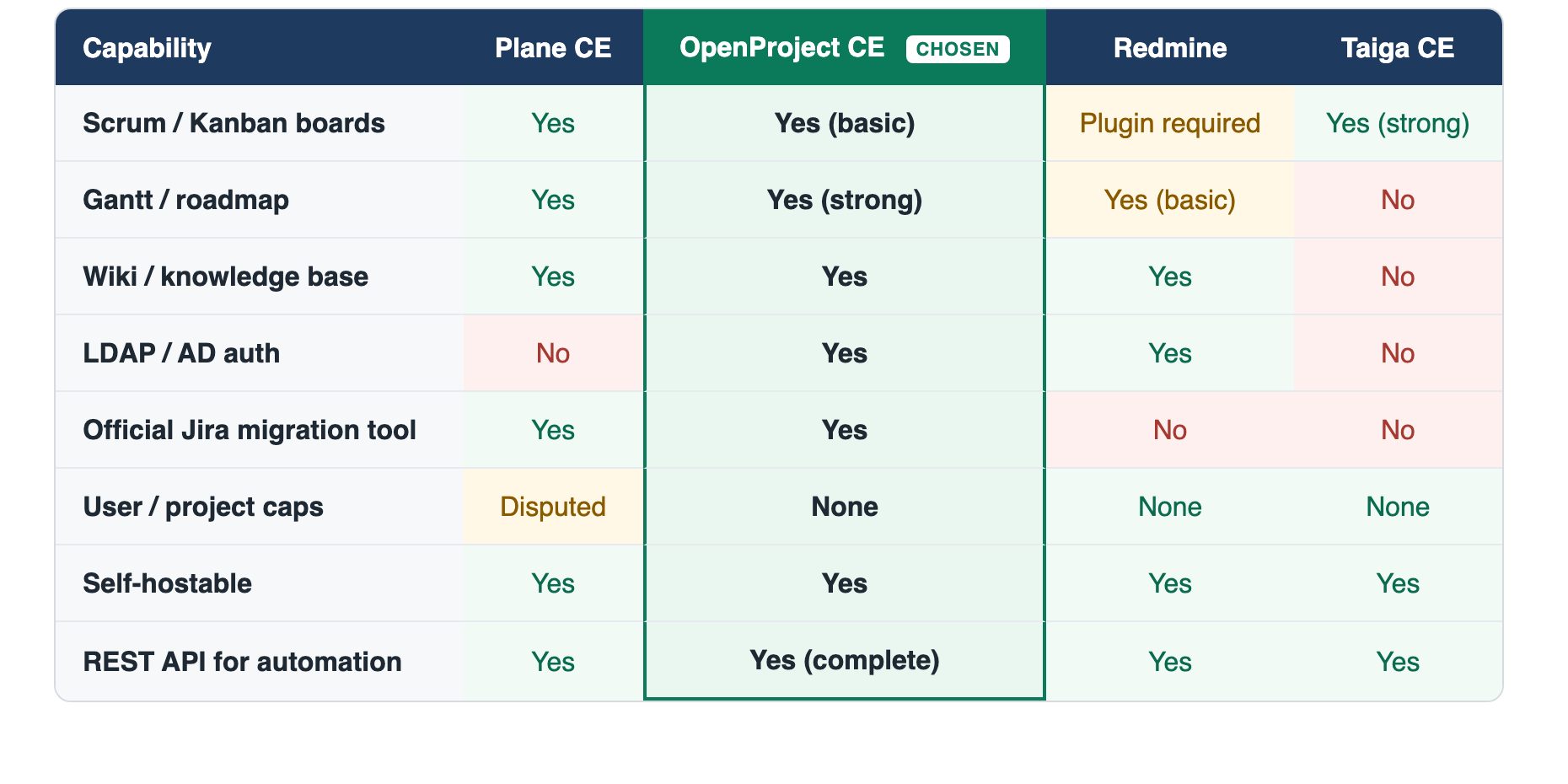
We evaluated four open-source options: Plane, OpenProject, Redmine and Taiga. All four can be self-hosted and all four expose a REST API, so those were entry requirements rather than differentiators.
What separated them:
Why OpenProject
OpenProject won on what it gave us out of the box, with nothing bought and nothing bolted on.
- Custom fields and configurable workflows, free. Status sets, transitions, and fields are definable per project and per type. This is the part most community editions charge for, and it is the part our automation depends on most: every workflow we run writes structured fields, not prose.
- A complete, well-documented REST API. This mattered more to us than any interface feature. Around fifty automated workflows create and update tickets automatically through the API, and they needed an API that could create work packages, discover and set custom field values, transition statuses, resolve users, post comments, and read activity history. OpenProject's API covered all of it.
Hosting on Kubernetes
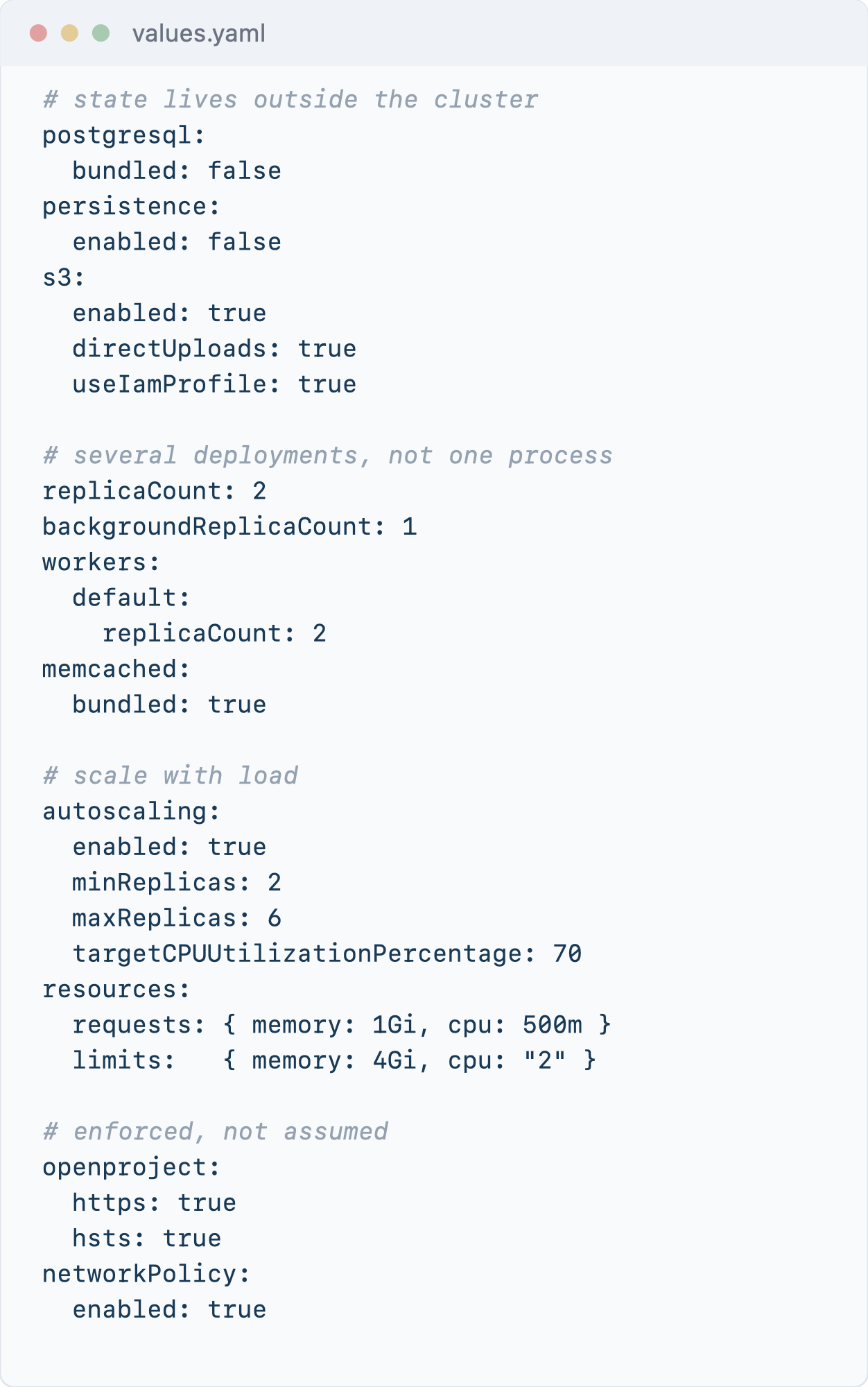
OpenProject runs on our Kubernetes cluster in its own namespace, deployed from the upstream Helm chart with our own values file. One choice in that file matters more than any other, because it is the difference between a demo install and something you can operate.
Nothing stateful lives in the cluster. The chart will happily bundle its own PostgreSQL and mount a shared volume for attachments. We turned both off. The database is a managed PostgreSQL instance outside the cluster, and attachments go to S3 with direct uploads, so the pods hold no durable state at all. Each pod gets a small ephemeral volume for scratch space and nothing else.
The shape of those overrides matters more than any single value, so here is the part of our values file that does the work:
Migration
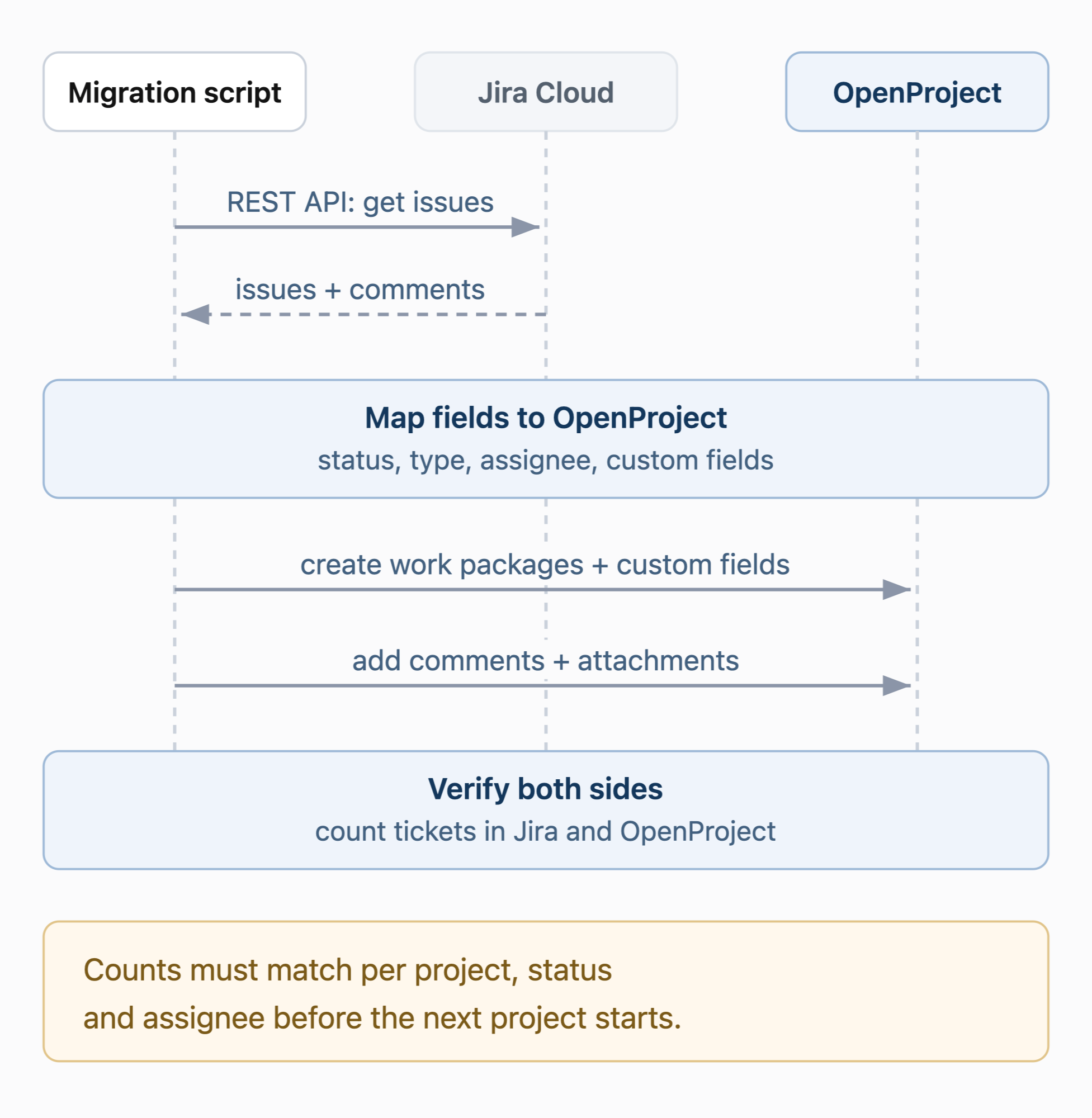
We migrated in waves rather than as one cutover, starting with the incident projects. They are high volume, heavily automated and simple in structure, which made them a proving ground for the code before anything irreplaceable moved. Then vertical by vertical, each one verified before the next began, so a mistake stayed contained to a single project.
Automation
This was the larger half of the project, and the part we had underestimated.
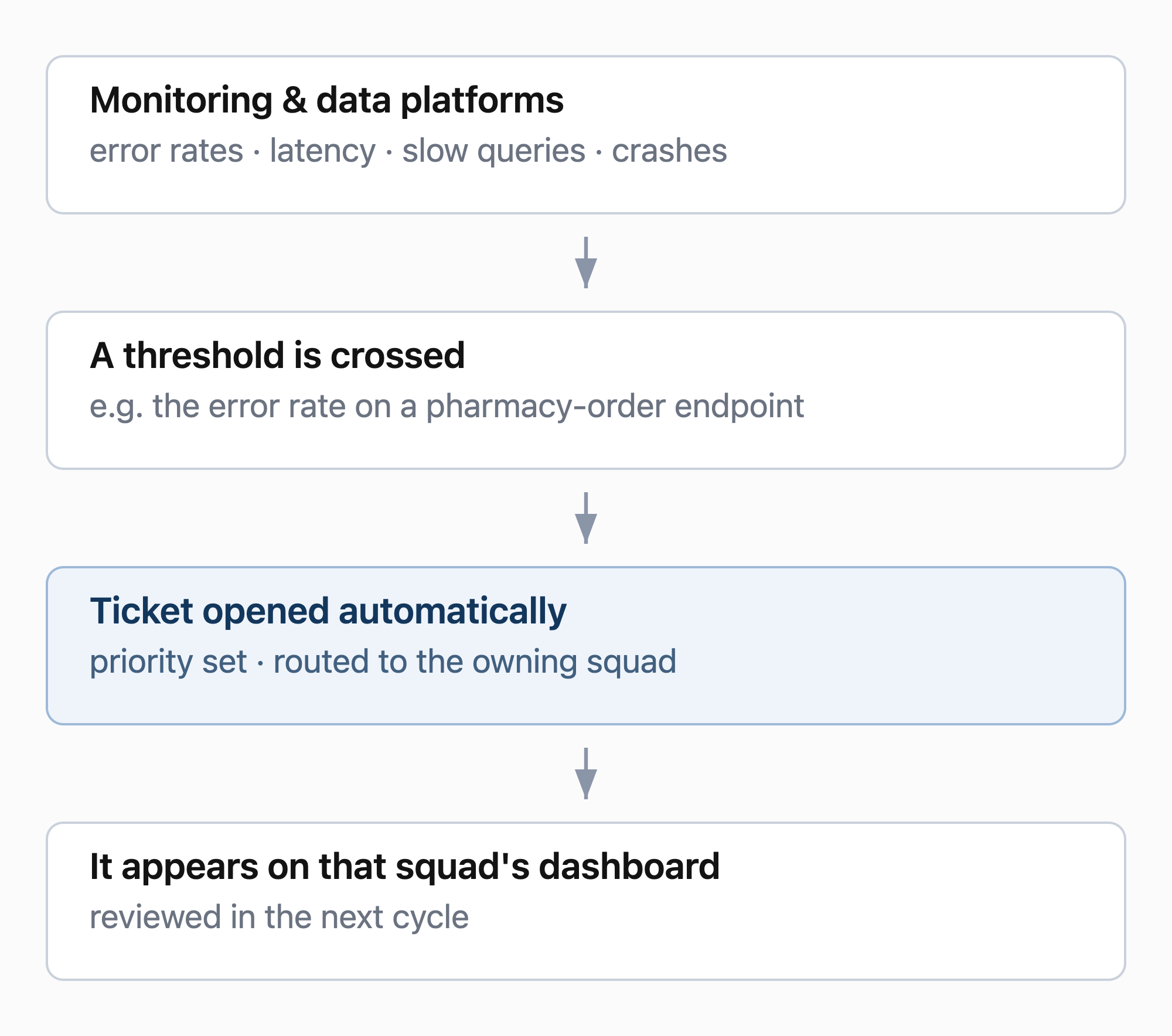
Very little of our engineering tracking is filed by hand. Around fifty automated workflows watch our monitoring and data platforms, and when something crosses a threshold they open the ticket themselves, route it to the owning squad, set its priority, and update the dashboard that squad reviews.
This is the layer that had to keep working throughout the migration.
Confluence to Google Docs
Evaluation
Documentation had a different list. We wanted somewhere people would actually write: searchable, easy to share, with versioning and sensible access control. Unlike tickets, no automation writes to it and no workflow engine sits behind it. What mattered was whether people would actually use it.
For Confluence we looked at BookStack, Wiki.js, XWiki — and Google Docs, which we were already paying for as part of our Google Workspace subscription.
Against that list, Google Docs held up better than expected. It is searchable, versioned, easy to share, and access control is something we already manage for the rest of the org. Nothing in our requirements needed a dedicated wiki product.
We picked it.
Why Google Docs
We ran an open-source evaluation and chose the proprietary option. It is worth explaining how, because the reasoning is the opposite of the ticket decision and both were right.
- Adoption was the actual problem, not features. Confluence was already being read by a fraction of the people licensed for it. Replacing an under-read wiki with a better-architected wiki that people still have to be persuaded to open solves nothing. Everyone here already writes in Google Docs daily — there was no new tool to learn, no new login, no new habit to build. The documentation that matters is documentation people actually open.
- The pattern worth taking from this: self-host where you need to own the interface, and buy where you need people to show up. Tickets were the first. Documentation was the second.
Migration
Confluence held more than 19,000 pages across team and personal spaces, along with their attachments, comments and the links between them.
The content is in Drive, organised by space — every space landed, with the hundred-odd global ones checked by hand and the personal long tail preserved as it came across rather than reviewed page by page.
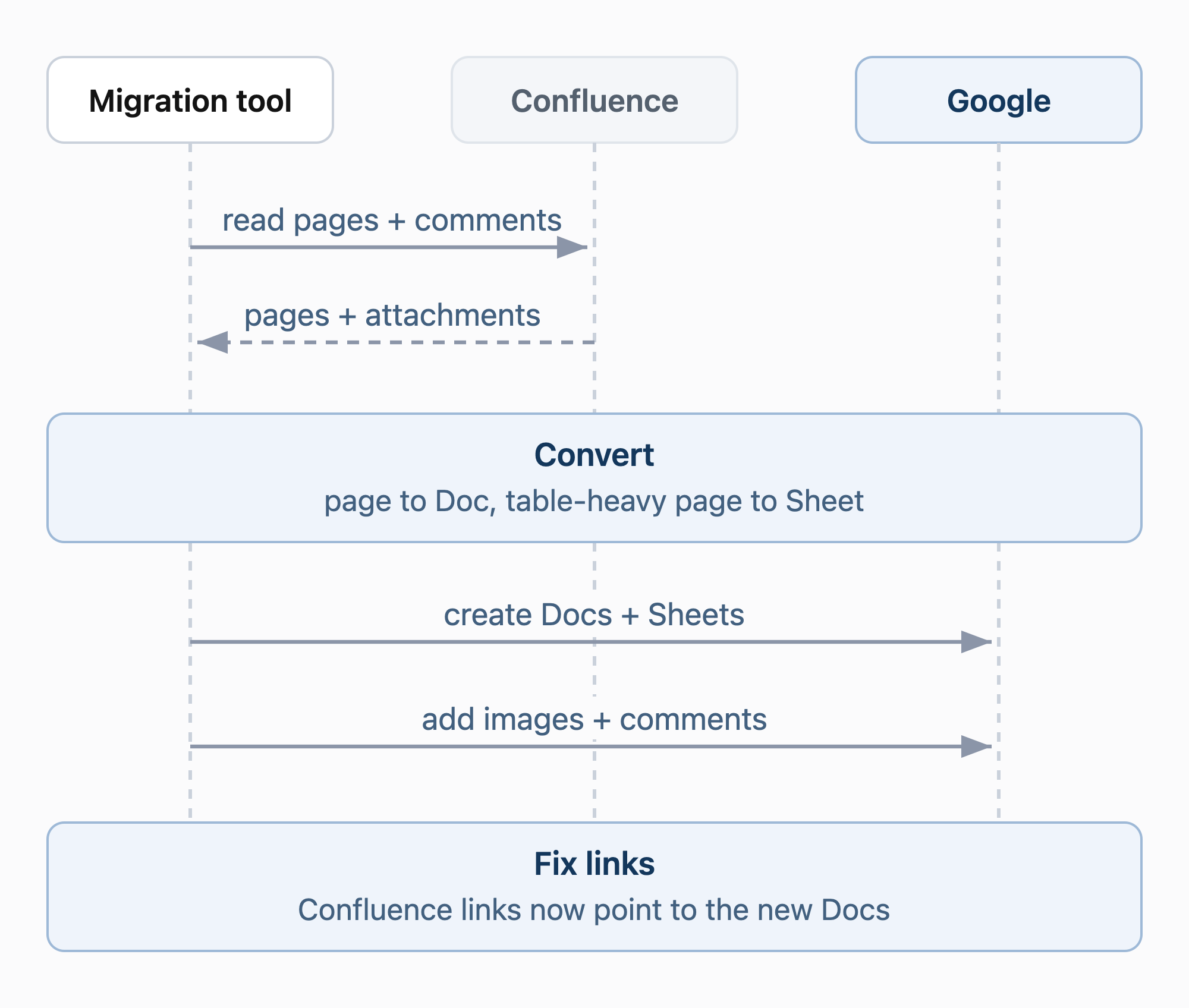
We built the migration tool ourselves. It reads Confluence through its REST API and writes Docs, Sheets and Drive files through the Google APIs.
- Read-only on the Confluence side. The tool can only read from Confluence. Writes are blocked at several levels, so the source stays untouched.
- One space at a time. Spaces are picked by name, key or ID. Each goes into its own Drive folder and keeps its own progress.
- Pages become Docs, tables become Sheets. Formatting, images, comments and @mentions carry across. Table-heavy pages, such as OKR trackers, go to Google Sheets.
- Images are resized and de-duplicated before they are uploaded.
- Links are fixed in a second pass. Once every page exists, each Confluence link inside a Doc is rewritten to point at the new Google Doc. A redirect map covers links held elsewhere.
- Safe to stop and restart. Progress is saved after every page, so a crash or a dropped connection resumes where it stopped.
What we learned
- Adoption matters more than features. The tool people already open every day beat a better-architected wiki they would have had to be persuaded to use.
- Match the answer to what depends on the tool. An API that automation relies on is worth owning. A place people already write is worth buying.
JSM to HelpDesk
Why we built it
Service management was different again. The forms, approvals and notifications our teams needed were specific to how they already work, so instead of adapting a product to them we built HelpDesk ourselves.
We started from the forms people already used in Jira Service Management, including its pick-lists, so the new tool stays familiar.
What it covers
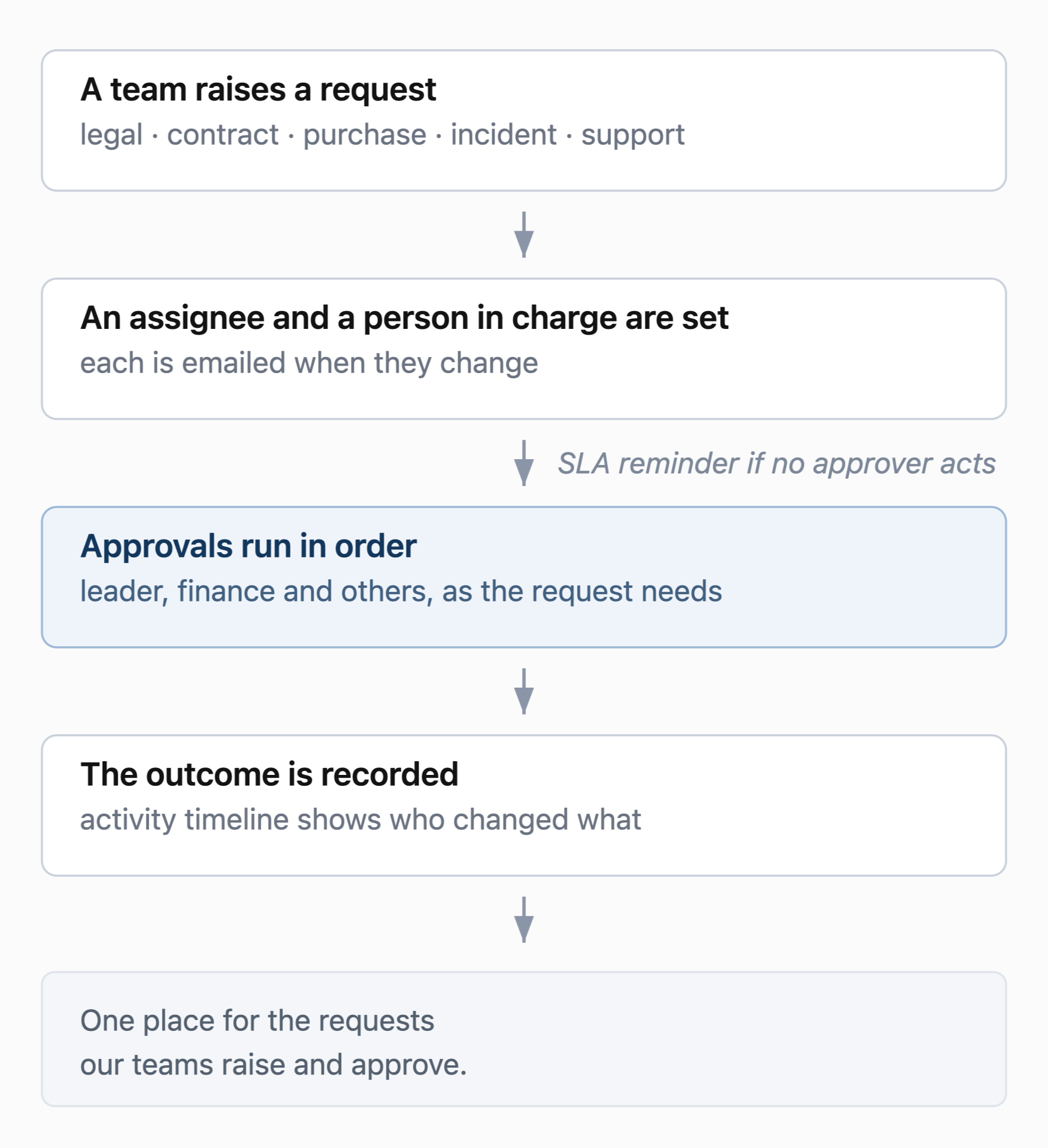
HelpDesk covers the requests our teams raise and approve:
- Support tickets, raised by email
- Legal requests and contracts, with review comments, watchers and a multi-step approval chain
- Purchase requisitions and purchase orders, with approval rules and Excel and CSV export
- Incident tracking, with severity levels and responders
Automation
- SLA reminders go to the current approvers when a request is still waiting after its SLA window.
- Email notifications go out when an assignee or person in charge changes, and for approvals.
- Activity timelines on contracts and legal requests show who changed what.
What we learned
- Build where the behaviour is specific to your teams. Approval chains for contracts and purchase requisitions follow our own rules, so the tool matches them directly.
- Start from what people already use. Reusing familiar forms and pick-lists keeps a new tool recognisable.
Where AI helped
- Choosing. Comparing eight tools meant reading a lot of documentation to work out what is genuinely free and what sits behind a paid tier. We had the agent build that comparison requirement by requirement, with a source for each answer, then checked the ones the decision turned on. Plane's seat cap shows the value: the agent reported that the FAQ and the billing docs contradict each other instead of picking one. An unresolved conflict, flagged as a conflict, was the useful result.
- Migrating. The agent helped us build both migration tools, the Jira to OpenProject scripts and the Confluence to Google Docs tool, working against the API references on both sides at once. Porting all of our workflows from one API to another is mechanical, repetitive and easy to get subtly wrong, and holding two API shapes in mind simultaneously is precisely the kind of work where an agent is faster than a person.
Where we landed
All 78 Jira spaces and roughly 110,000 tickets are migrated, with comments, attachments and parent links carried across — verified by counting both sides independently, per project, per status and per assignee, rather than trusting the migration's own report of success. Every automated workflow now runs against OpenProject, and nothing still writes to Jira.
Service management runs on HelpDesk, our own tool, which replaced JSM on the same reasoning that kept the ticket platform in-house: the behaviour we wanted was specific to how our teams already work.
Cost savings
Moving off the three tools removed their licence costs, which grew with headcount. What we took on in their place is the cost of running our own:
- OpenProject. The Kubernetes pods, the managed PostgreSQL instance and the S3 storage for attachments. We counted all of it against the saving.
- Documentation. Google Docs is part of the Google Workspace subscription we already pay for, so it added no new licence.
- Service desk. HelpDesk is software we built ourselves, so there is no licence to pay.
Across Jira, Confluence and Jira Service Management, and after counting what it costs to host OpenProject, our spend came down by around 80%.
References
- OpenProject documentation: https://www.openproject.org/docs/
- OpenProject API v3 documentation: https://www.openproject.org/docs/api/
- OpenProject Helm chart: https://github.com/opf/helm-charts
- Jira Cloud REST API: https://developer.atlassian.com/cloud/jira/platform/rest/v3/
Join us
We are always looking for engineers who want to work on problems like this one — at the scale of a healthcare platform that millions of people depend on. If building and running infrastructure that keeps doctors, pharmacies, and patients connected sounds like your kind of work, take a look at our open roles at halodoc.com/careers.
About Halodoc
Halodoc is the number one all-around healthcare application in Indonesia. Our mission is to simplify and deliver quality healthcare across Indonesia, from Sabang to Merauke. Since 2016, Halodoc has been improving health literacy in Indonesia by providing user-friendly healthcare communication, education, and information (KIE). In parallel, our ecosystem has expanded to offer a range of services that facilitate convenient access to healthcare, starting with Homecare by Halodoc as a preventive care feature that allows users to conduct health tests privately and securely from the comfort of their homes; My Insurance, which allows users to access the benefits of cashless outpatient services in a more seamless way; Chat with Doctor, which allows users to consult with over 20,000 licensed physicians via chat, video or voice call; and Health Store features that allow users to purchase medicines, supplements and various health products from our network of over 4,900 trusted partner pharmacies. To deliver holistic health solutions in a fully digital way, Halodoc offers Digital Clinic services including Haloskin, a trusted dermatology care platform guided by experienced dermatologists. We are proud to be trusted by global and regional investors, including the Bill & Melinda Gates Foundation, Singtel, UOB Ventures, Allianz, GoJek, Astra, Temasek, and many more. With over USD 100 million raised to date, including our recent Series D, our team is committed to building the best personalized healthcare solutions — and we remain steadfast in our journey to simplify healthcare for all Indonesians.
