

From AWS NAT Gateway to NAT Instance: A Cost-Optimized Networking Strategy
At Halodoc, we continuously look for ways to optimise our infrastructure for cost and performance, especially in non-production environments where flexibility often outweighs the need for fully-managed services. One of our recent initiatives involved replacing AWS-managed NAT Gateways with a more cost-effective alternative: NAT instances, powered by an open-source project called fck-nat.
While AWS NAT Gateway is a convenient and scalable solution for outbound internet access from private subnets, the cost associated with it in multiple non-production environments was significant. With per-hour charges and data processing fees, expenses quickly add up where high availability isn’t always critical. This prompted us to explore a more flexible and cost-efficient alternative that better matched our usage patterns without compromising functionality.
In this blog, we’ll explore why we made this switch, its benefits, and our strategy for a smooth migration.
Background
In our non-production AWS environments such as staging, testing and CI/CD infrastructure we follow a standard VPC architecture with private and public subnets. Services in private subnets often need to communicate with the internet for various use cases such as downloading dependencies, connecting to external APIs, etc. and this has been achieved using AWS-managed NAT Gateways.
NAT Gateways play a critical role in enabling various non-prod workloads to function smoothly:
- Staging : Many micro-services fetch external SDKs, container images or integration keys from external services during initialisation. Some services will also make calls to external APIs for specific use-cases.
- CI/CD : Jenkins agents access the internet to download build dependencies like Maven packages, npm modules, Docker images, etc.
- QA Environments : Automations in private subnets often perform external HTTPS calls during end-to-end flow testing, including requests to our public websites or third-party APIs.
Outbound traffic were routed through AWS NAT Gateways. Though it is much reliable and easy to manage, this approach has significant cost associated with it. With the number of VPCs we use across different environments, NAT Gateway charges quickly became a significant portion of our monthly AWS bill, especially for environments that don't need the same level of SLA as production.
Understanding NAT Instance and Why We Chose fck-nat
Before diving into the implementation, it’s important to understand what a NAT instance is and how it compares to an AWS NAT Gateway.
What is a NAT Instance?
A NAT (Network Address Translation) instance is an EC2 instance configured to allow instances in private subnets to initiate outbound connections to the internet, while still preventing unsolicited inbound traffic. This setup functions similarly to an AWS NAT Gateway, but instead of relying on a fully managed service, you manage the NAT functionality using a self-managed EC2 instance.
NAT instances offer greater flexibility and are significantly cheaper. However, they require you to manage aspects like:
- Enabling IP forwarding and iptable rules
- Configuring route tables
- Monitoring instance health and traffic
Why we chose fck-nat?
fck-nat is an open-source project that simplifies the process of setting up and running a NAT instance. It abstracts away the complexity of configuration and brings several key advantages that makes it a strong fit for our use case.
- Cost Savings : Switching from NAT Gateway to fck-nat significantly brought down our networking costs. With NAT Gateway, we were paying for both instance uptime and data processing, which quickly adds up when there are multiple NAT's and high package dependency downloads. With fck-nat, we now pay only for the underlying EC2 instance leading to a substantial cost savings.

- Zero-Hassle Configuration : fck-nat provides a prebuilt AMI that does all the heavy lifting like enabling IP forwarding, configuring NAT rules, and setting up basic CloudWatch alarms. All that needs to be done is launching the EC2 instance using the AMI.
- Flexibility in Instance Choice : Full control over the instance type used for NAT with fck-nat. Select the right instance based on the traffic.
Architecture Overview: NAT Instance with fck-nat
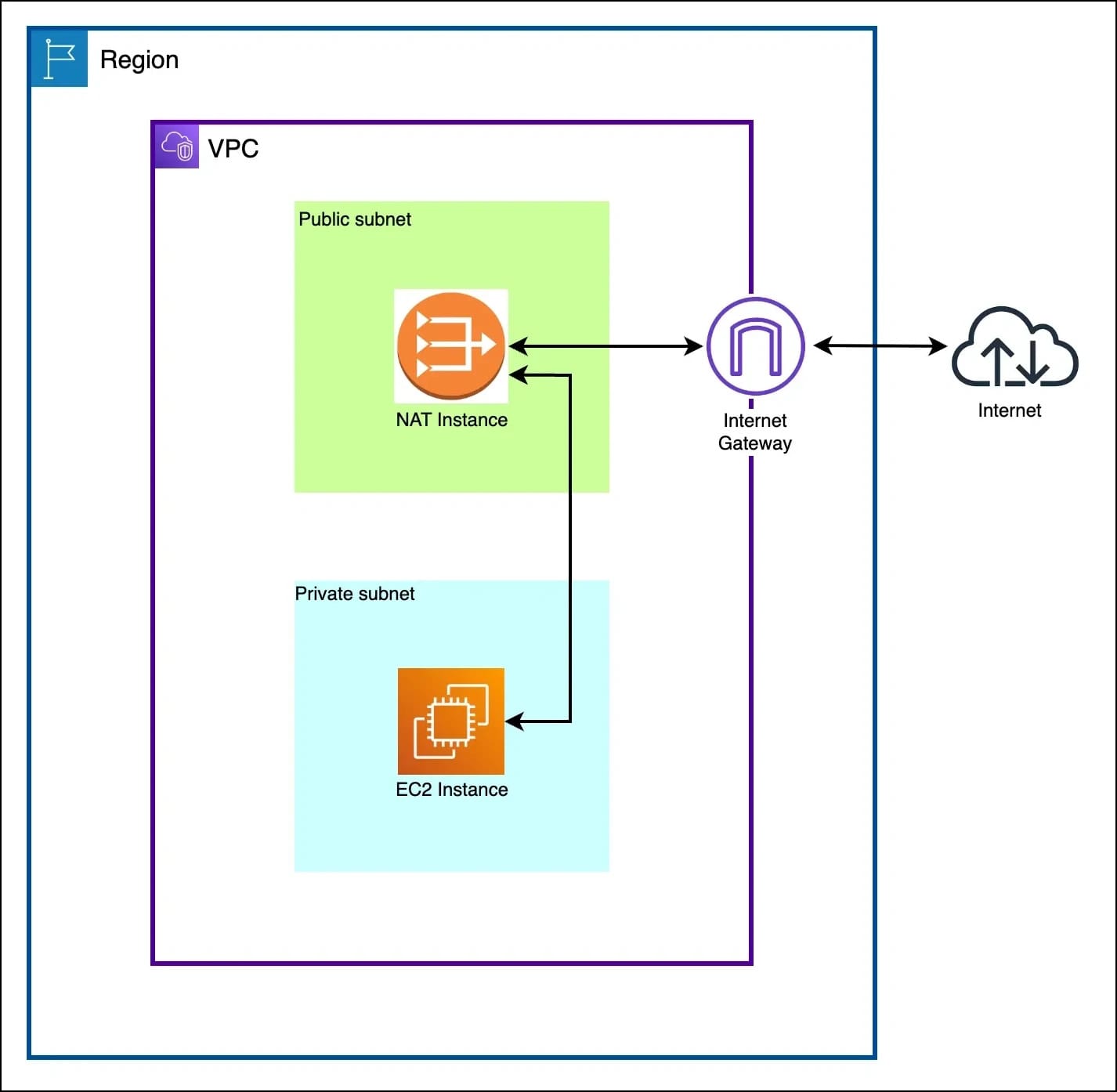
We deploy the fck-nat instance in a public subnet with a static Elastic IP to handle outbound traffic from private subnets. Route tables forward all 0.0.0.0/0 traffic to the instance’s network interface. The instance has source/destination check disabled to allow packet forwarding and security groups permit traffic from private CIDRs to the internet. For maintenance, we use AWS Systems Manager (SSM).
When a private instance initiates an external request, the traffic is routed to the NAT instance. fck-nat performs Source Network Address Translation (SNAT), replacing the source IP of the packet with its own public Elastic IP — and forwards it to the internet. The response is received back on the same Elastic IP, translated again and sent to the originating instance.
Under the hood, the fck-nat AMI enables IP forwarding by setting net.ipv4.ip_forward=1 , allowing the instance to act as a layer 3 router. It also disables reverse path filtering to avoid packet drops in asymmetric routing scenarios. For the actual NAT behaviour, it uses an iptables POSTROUTING rule with MASQUERADE, which rewrites the source IP of outbound packets to the public IP of the NAT instance.
iptables -t nat -A POSTROUTING -o "$nat_interface" -j MASQUERADE
Deployment Approach
The fck-nat project supports various deployment methods including manual EC2 launch, CloudFormation templates and infrastructure-as-code (IaC) tools like Terraform and Pulumi. At Halodoc, Terraform is our standard for managing AWS infrastructure, so we naturally chose to implement NAT instance provisioning using a Terraform module.
We adopted a well-maintained open-source module from terraform-aws-fck-nat, which provides a plug-and-play wrapper around the fck-nat AMI. This helped us avoid reinventing the wheel and allowed quick, consistent provisioning of NAT instances across environments.
Sample code-snippet for configuring NAT instance :
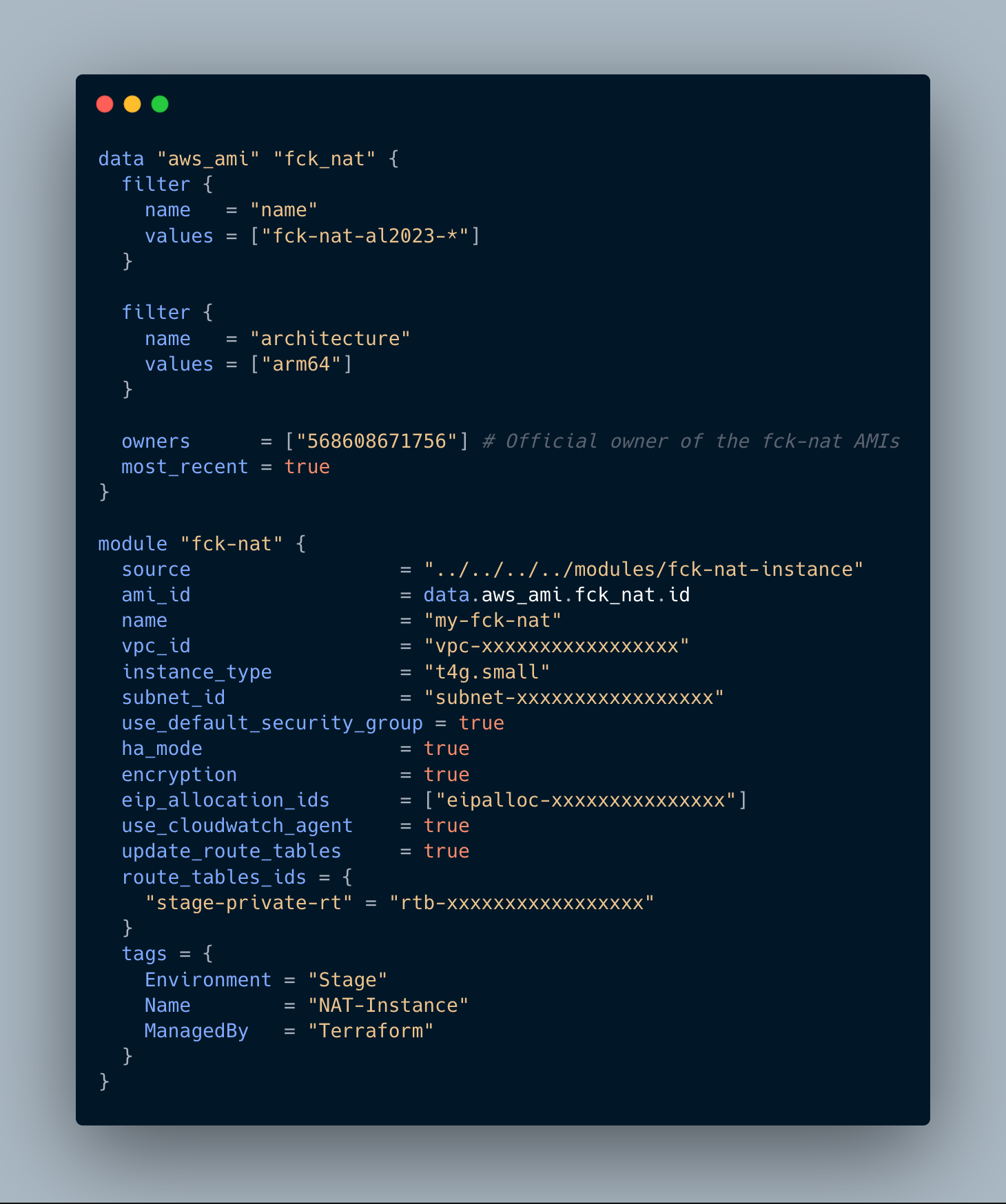
Key points in the configuration :
- AMI Discovery: The module fetches the latest official
fck-nat-al2023-*AMI for the ARM64 architecture, optimised for use with Graviton-based EC2 instances. - VPC & Subnet Placement: The NAT instance is deployed in a public subnet within an existing VPC. The subnet must be connected to an internet gateway and the instance should have a public Elastic IP attached to enable outbound internet access.
- Instance Type Selection: One advantage of using NAT instance over managed NAT Gateway is that we can choose the EC2 instance type based on expected traffic. For our workload, a
t4g.smallinstance was more than sufficient. - High Availability Mode: The module supports
ha_mode = trueto provide optional failover support, improving the reliability. - EIP: Attaching a Elastic IP ensures consistent public IP usage for all outbound traffic.
- CloudWatch Agent: EC2 provides basic instance-level monitoring by default. For use cases that require deeper visibility into metrics like network throughput, CPU and memory, enabling the CloudWatch Agent offers more granular insights.
- Route Table Updates: The module automatically associates the NAT instance with the route table of the private subnets, removing the need for manual changes.
Cost Savings and Impact
One of the primary motivation behind moving away from AWS NAT Gateways was the significant operational cost they introduced, especially when used across multiple non-production environments.
AWS NAT Gateway pricing includes:
- Per-hour instance charge
- Per-GB data processing charge
These costs will quickly add up when multiple NAT Gateways are used across different environments. For instance, even a single NAT Gateway running continuously with moderate traffic can easily exceed $150–$200/month.
NAT instance using fck-nat includes only:
- EC2 instance cost
There is no separate data processing charge involved, the only cost will be for the compute capacity of the instance regardless of how much traffic passes through the NAT.
In our case, the cost dropped by over 90% across all non-prod environments by replacing multiple NAT Gateways with NAT instances in these environments.
Conclusion
Migrating from AWS NAT Gateway to NAT instances using fck-nat has proven to be a highly effective optimisation for our non-production workloads. It gave us full control over configuration, reduced our dependency on managed services and most importantly, led to significant cost savings without compromising performance.
By leveraging open-source tooling and infrastructure-as-code, we were able to integrate this solution seamlessly into our existing workflows. While managed NAT Gateways are better suited for high-availability production environments, NAT instances offer greater flexibility and cost efficiency — making them an ideal choice for non-production workloads like staging, development, testing and CI/CD.
References
https://docs.aws.amazon.com/vpc/latest/userguide/VPC_NAT_Instance
https://fck-nat.dev/stable/
https://github.com/RaJiska/terraform-aws-fck-nat
Join Us
Scalability, reliability and maintainability are the three pillars that govern what we build at Halodoc Tech. We are actively looking for engineers at all levels and if solving hard problems with challenging requirements is your forte, please reach out to us with your resumé at careers.india@halodoc.com.
About Halodoc
Halodoc is the number one all-around healthcare application in Indonesia. Our mission is to simplify and deliver quality healthcare across Indonesia, from Sabang to Merauke. Since 2016, Halodoc has been improving health literacy in Indonesia by providing user-friendly healthcare communication, education, and information (KIE). In parallel, our ecosystem has expanded to offer a range of services that facilitate convenient access to healthcare, starting with Homecare by Halodoc as a preventive care feature that allows users to conduct health tests privately and securely from the comfort of their homes; My Insurance, which allows users to access the benefits of cashless outpatient services in a more seamless way; Chat with Doctor, which allows users to consult with over 20,000 licensed physicians via chat, video or voice call; and Health Store features that allow users to purchase medicines, supplements and various health products from our network of over 4,900 trusted partner pharmacies. To deliver holistic health solutions in a fully digital way, Halodoc offers Digital Clinic services including Haloskin, a trusted dermatology care platform guided by experienced dermatologists.We are proud to be trusted by global and regional investors, including the Bill & Melinda Gates Foundation, Singtel, UOB Ventures, Allianz, GoJek, Astra, Temasek, and many more. With over USD 100 million raised to date, including our recent Series D, our team is committed to building the best personalized healthcare solutions — and we remain steadfast in our journey to simplify healthcare for all Indonesians.