

Parallel iOS Unit Tests at Halodoc: Cut Execution Time, Ship Faster
At Halodoc, reliable releases aren’t a vanity metric—they’re healthcare-critical. Faster feedback loops protect patient experience and keep developer time focused on shipping quality. We have approximately 5000 UTs in our app. By enabling Apple’s parallel test execution, we have cut down our UT time from 14 minutes to ~5 minutes.
In this post, we’ll discuss how we enabled parallel test execution, the improvements we made (time-dependent tests, shared storage, stale observers), and the measurable gains in both speed and reliability.
Why We Adopted Parallel Test Execution
As a part of our continuous improvement towards the CI/CD pipeline, we moved to parallel execution to keep feedback loops tight. With Xcode’s robust parallel testing support, we proactively redesigned our pipeline—before long runtimes could slow teams down.
Understanding Parallel Test Execution in Xcode
Parallel testing in Xcode allows tests to run across multiple simulator instances simultaneously, rather than executing them one after another on a single simulator. This means better CPU utilisation and reduced test execution time. Xcode supports parallel testing out of the box through its testing infrastructure.
Xcode clones multiple simulators to distribute the test workload. By default number of parallel testing workers is three, which can be modified based on infrastructure capacity, CPU core count, and RAM availability. Here is the config to enable Parallel Test and change worker count.
-parallel-testing-enabled YES
-parallel-testing-worker-count 4
The worker count should balance CPU utilisation against memory constraints—too many workers can cause system thrashing. In practice, you can scale the worker count based on your machine’s infrastructure capacity
Our Implementation Journey
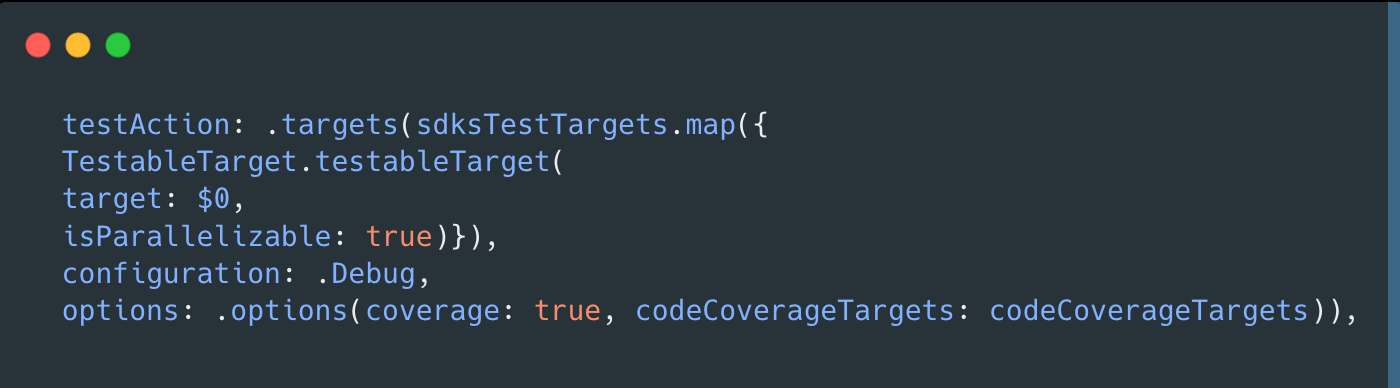
We use Tuist for our project generation and SPM for dependency management. In our Tuist project configuration, we enabled parallel test execution by setting isParallelizable: true for all SDK test targets in the testAction, which instructs Xcode to run these tests concurrently across multiple simulators in Debug mode with code coverage enabled.
We covered our SPM integration with Tuist in detail in our earlier blog on Migrating Complex iOS projects to SPM
Enabling Parallel Testing with CocoPods or Manual Integration
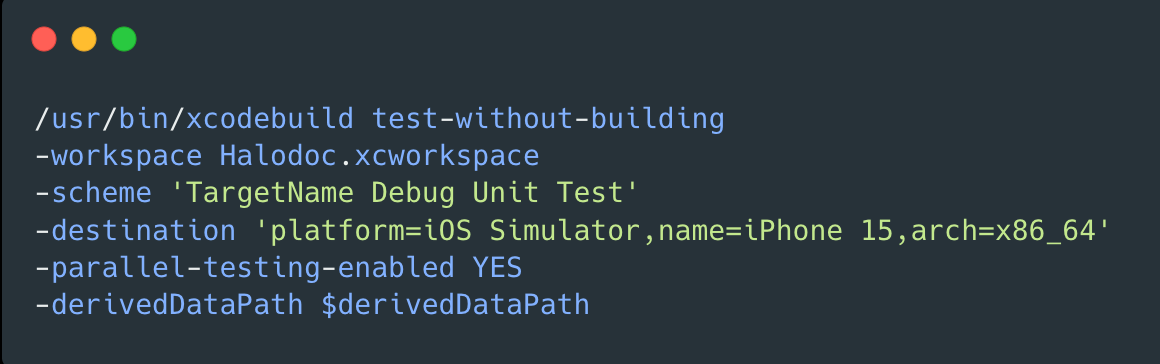
Alternatively, you can enable parallel test execution in your CI/CD pipeline by adding the -parallel-testing-enabled YES parameter to your xcodebuild command, which allows tests to run concurrently across multiple simulator instances on the simulator.
Things to Consider Before Enabling Parallelisation
The following considerations are critical for successful parallel test execution. While some points reflect general unit testing best practices (avoiding shared state, dependency injection), they become essential—and their violations more visible—when tests run in parallel.
1. Balance Test Distribution
Xcode distributes tests across workers at the class level—not per test method. So if you have one test class packed with hundreds of tests, that entire class will run on a single worker. This can easily create a bottleneck where one busy worker ends up slowing down the entire test suite.
// Poor distribution: One large test class
class UserTests: XCTestCase {
    // 100+ test methods here
}

// Better distribution: Split into focused test classes
class UserAuthenticationTests: XCTestCase { }
class UserProfileTests: XCTestCase { }
class UserPreferencesTests: XCTestCase { }
2. Avoid Shared State in Parallel Tests
Any shared, mutable state—preferences, singletons, caches—will cause tests to fail randomly unless we isolate it per test and clean up deterministically.
IsolateUserDefaults (no globals):
import XCTest

final class SettingsManagerTests: XCTestCase {
  private var userDefaults: UserDefaults!
  private var suiteName: String!

  override func setUp() {
    super.setUp()
    suiteName = "test.settings.\(UUID().uuidString)"
    userDefaults = UserDefaults(suiteName: suiteName)
    XCTAssertNotNil(userDefaults) // sanity check
  }

  override func tearDown() {
    // Clean up the *exact* domain we created
    if let suiteName { userDefaults.removePersistentDomain(forName: suiteName) }
    userDefaults = nil
    suiteName = nil
    super.tearDown()
  }

  func testSaveUserPreference() {
    userDefaults.set(true, forKey: "darkModeEnabled")
    XCTAssertTrue(userDefaults.bool(forKey: "darkModeEnabled"))
    // test logic...
  }
}
Notes: Never use UserDefaults.standard in parallel tests. Create a fresh suite per test and delete that domain in tearDown to prevent ghost state between shards.
3. Replace singletons with dependency injection (no shared config):
Avoid NetworkManager.shared.configure(…) patterns in tests. Inject a fresh instance per test, scoped to the test’s lifetime. If global singletons are unavoidable in app code, provide a test-only reset hook or wrap mutable state in anactor to serialize access.
// Define an interface so tests can inject a real or mock implementation
protocol Networking {
  func fetchData() throws -> Data
}

struct NetworkManager: Networking {
  let baseURL: URL
  func fetchData() throws -> Data {
    // real implementation…
    Data()
  }
}

final class NetworkManagerTests: XCTestCase {
  private var network: Networking!

  override func setUp() {
    super.setUp()
    // Use a non-routable placeholder to avoid leaking internal hosts
    network = NetworkManager(baseURL: URL(string: "https://example.test")!)
  }

  func testAPICall() throws {
    let data = try network.fetchData()
    XCTAssertFalse(data.isEmpty) // or specific assertions
  }
}
4. Handle Threading and Synchronisation Properly
Xcode runs parallel tests by sharding your suite across multiplexctest processes (often on cloned simulators). Each shard executes its tests serially, but your code under test may still spin up background work, callbacks, or async tasks. Any utility that relies on shared, mutable state must be made concurrency-safe—and anything shared across shards (files, UserDefaults, databases) must be isolated per test.
// Don’t do this (shared mutable global):
// Problem: shared mutable state + potential races
final class TestDataManager {
  static var testUsers: [String: User] = [:]

  static func createTestUser() -> User {
    let user = User(id: UUID().uuidString)
    testUsers[user.id] = user   // Risky: unsynchronized writes
    return user
  }
}

// Prefer an actor (serialized access, test-friendly):
// Better: serialize mutations with an actor
actor TestDataManager {
  private var testUsers: [String: User] = [:]

  func createTestUser() -> User {
    let user = User(id: UUID().uuidString)
    testUsers[user.id] = user
    return user
  }

  func user(id: String) -> User? {
    testUsers[id]
  }

  func reset() {
    testUsers.removeAll()
  }
}

// Usage in tests:
@MainActor
final class UserFlowTests: XCTestCase {
  let manager = TestDataManager()

  func testCreatesUser() async {
    let user = await manager.createTestUser()
    XCTAssertNotNil(await manager.user(id: user.id))
    await manager.reset()
  }
}
5. Isolate File System Operations
Tests that read from or write to the same file paths can cause race conditions:
// Problem: Tests writing to same paths
class CacheManagerTests: XCTestCase {
  func testCacheStorage() {
    let path = "/tmp/halodoc_cache.json"
    // Write cache data
  }
}

// Better: Use unique temporary directories
class CacheManagerTests: XCTestCase {
  var tempDirectory: URL!

  override func setUp() {
    super.setUp()
    let baseTemp = FileManager.default.temporaryDirectory
    tempDirectory = baseTemp.appendingPathComponent(UUID().uuidString)
    try? FileManager.default.createDirectory(at: tempDirectory,
                                             withIntermediateDirectories: true)
  }

  override func tearDown() {
    try? FileManager.default.removeItem(at: tempDirectory)
    super.tearDown()
  }

  func testCacheStorage() {
    let cachePath = tempDirectory.appendingPathComponent("cache.json")
    // Now fully isolated
  }
}
6. Make Tests Time-Independent
Tests that rely on the current time or date can produce inconsistent results:
// Problem: Tests dependent on current time
class AppointmentTests: XCTestCase {
  func testUpcomingAppointments() {
    let appointments = getUpcomingAppointments()
    XCTAssertEqual(appointments.count, 3)  // Fails at different times
  }
}

// Better: Inject time dependencies
protocol TimeProvider {
  var now: Date { get }
}

class MockTimeProvider: TimeProvider {
  var now: Date = Date()
}

class AppointmentTests: XCTestCase {
  var timeProvider: MockTimeProvider!
  var appointmentManager: AppointmentManager!

  override func setUp() {
    super.setUp()
    timeProvider = MockTimeProvider()
    timeProvider.now = Date(timeIntervalSince1970: 1704067200) // Fixed date
    appointmentManager = AppointmentManager(timeProvider: timeProvider)
  }

  func testUpcomingAppointments() {
    let appointments = appointmentManager.getUpcomingAppointments()
    XCTAssertEqual(appointments.count, 3)
  }
}
7. Clean Up Notification Observers
Parallel execution can amplify hidden leaks. For example, unreleased observers can trigger duplicate callbacks, leading to inconsistent test results. To avoid this, register observers within each test, prefer using a fresh NotificationCenter when possible, and always clean up by removing observer tokens in tearDown()
// Problem: (selector-based, no cleanup)
final class UserSessionTests: XCTestCase {
  @objc private func handleExpiry(_ note: Notification) { /* ... */ }

  func testSessionExpiry() {
    NotificationCenter.default.addObserver(
      self,
      selector: #selector(handleExpiry),
      name: .sessionExpired,
      object: nil
    )
    // ... no removal; future tests get duplicate callbacks
  }
}

// Prefer token-based observers with explicit teardown:
import XCTest

extension Notification.Name {
  static let sessionExpired = Notification.Name("sessionExpired")
}

final class UserSessionTests: XCTestCase {
  private var center: NotificationCenter!
  private var token: NSObjectProtocol?

  override func setUp() {
    super.setUp()
    // Fresh center per test for isolation (inject this into code under test)
    center = NotificationCenter()
  }

  override func tearDown() {
    if let token { center.removeObserver(token); self.token = nil }
    center = nil
    super.tearDown()
  }

  func testSessionExpiry() {
    let exp = expectation(description: "session expired observed")

    token = center.addObserver(forName: .sessionExpired, object: nil, queue: nil) { _ in
      exp.fulfill()
    }

    // Exercise: code under test should post on the injected center
    center.post(name: .sessionExpired, object: nil)

    wait(for: [exp], timeout: 1.0)
  }
}
What We Achieved
After implementing parallel testing and refactoring our test suite, we saw significant improvements:
- 2–3× faster test execution: Wall-clock dropped from ~14 min to ~5 min across local runs and CI/CD.
- Higher reliability: Isolation work surfaced hidden UT failures. fixing it reduced intermittent failures.
- Quicker feedback loops: Developers get results sooner, enabling tighter iteration during peak hours.
- Team-level impact: With dozens of runs per day, the aggregate savings add up to hours reclaimed daily.
Limitations of Parallel Test Execution
1. Hardware Constraints
- Memory: Each simulator clone consumes significant RAM (1-2GB per instance). With 3-4 simulators running, you need 8-16GB+ RAM
- CPU: More parallel workers = higher CPU usage. Systems can throttle or hang if overloaded
- Disk I/O: Multiple simulators accessing derived data simultaneously can cause I/O bottlenecks
2. Simulator Limits
- Xcode has practical limits on concurrent simulators (typically 3-8 depending on your machine)
- Boot time overhead: Starting simulators adds initial delay before tests begin
3. Scaling from 5K to 20K Tests
- Diminishing returns: Parallelisation gives 2-4x speedup max (not linear scaling)
- Class-level distribution: Xcode parallelises at the test class level, not individual tests. If you have 20K tests in 100 classes, you're limited by your slowest class
Swift 6: Safer Concurrency for Tests
Looking ahead, Swift 6 offers enhanced concurrency safety features that can make parallel test execution even more robust. These features provide a clear path for safer parallel testing:
- Sendable Protocol
In Swift 6, theSendable protocol is a label the compiler checks. It means a value can be safely handed from one concurrent task to another without hidden shared mutable state. It’s about safe transfer, not a blank guarantee of ‘thread-safe in all cases’.
struct UserTestData: Sendable {
    let id: String
    let name: String
    let email: String
}

class MockAPIService: Sendable {
    let testData: UserTestData  // Compiler ensures thread safety
}
- Actor Isolation
Actors in Swift 6 automatically serialize access to their mutable state, ensuring only one operation happens at a time. When multiple parallel tests access an actor's methods, the actor queues these accesses automatically—eliminating race conditions without manual locks. This makes actors ideal for test utilities that manage shared resources across parallel test executions.
actor TestDataManager {
    private var testUsers: [String: User] = [:]

    func createTestUser() -> User {
        let user = User(id: UUID().uuidString)
        testUsers[user.id] = user
        return user
    }
}

class UserServiceTests: XCTestCase {
    let dataManager = TestDataManager()

    func testUserCreation() async {
        let user = await dataManager.createTestUser()
        // Test logic
    }
}
- Data-Race Safety
Swift 6's strict concurrency checking analyzes code at compile time to detect potential data races—where multiple threads access the same memory with at least one write operation. Issues that previously appeared as random test failures now show up as compiler warnings, forcing you to use actors, Sendable types, or other concurrency-safe patterns before your tests even run.
// Swift 6 catches this at compile time
class TestConfig {
    var baseURL: String = ""  // Warning: shared mutable state
}

// Swift 6 encourages safer patterns
actor TestConfig {
    var baseURL: String = ""  // Safe: actor provides synchronization
}
These Swift 6 features make it easier to write parallel-safe tests from the start and catch concurrency issues at compile time rather than runtime.
Conclusion
Parallel execution delivered a clear win at Halodoc: ~2–3× faster test runs and a more robust suite. The result is faster feedback, predictable pipelines, and smoother CI throughput.
Key takeaways:
- Start early: Turn on parallelism with a small worker count, then surface and fix shared-state issues.
- Isolate ruthlessly: Per-test
UserDefaultssuites, unique temp dirs, no shared singletons; use actors for mutable helpers. - Inject dependencies: Prefer constructor-injected instances over global configuration.
- Refactor in slices: Quarantine failing tests and start fixing incrementally, re-measure after each step.
If your build time is troubling you, parallelization pays back quickly—both in productivity and CI/CD efficiency—provided you pair it with disciplined isolation and measurement.
References


 M Shyam Kumar
 Sakshi Bala
Join Us
Scalability, reliability and maintainability are the three pillars that govern what we build at Halodoc Tech. We are actively looking for engineers at all levels, and if solving hard problems with challenging requirements is your forte, please reach out to us with your resumé at careers.india@halodoc.com.
About Halodoc
Halodoc is the number one all-around healthcare application in Indonesia. Our mission is to simplify and deliver quality healthcare across Indonesia, from Sabang to Merauke.
Since 2016, Halodoc has been improving health literacy in Indonesia by providing user-friendly healthcare communication, education, and information (KIE). In parallel, our ecosystem has expanded to offer a range of services that facilitate convenient access to healthcare, starting with Homecare by Halodoc as a preventive care feature that allows users to conduct health tests privately and securely from the comfort of their homes; My Insurance, which allows users to access the benefits of cashless outpatient services more seamlessly; Chat with Doctor, which allows users to consult with over 20,000 licensed physicians via chat, video or voice call; and Health Store features that allow users to purchase medicines, supplements and various health products from our network of over 4,900 trusted partner pharmacies. To deliver holistic health solutions in a fully digital way, Halodoc offers Digital Clinic services, including Haloskin, a trusted dermatology care platform guided by experienced dermatologists.
We are proud to be trusted by global and regional investors, including the Bill & Melinda Gates Foundation, Singtel, UOB Ventures, Allianz, GoJek, Astra, Temasek, and many more. With over USD 100 million raised to date, including our recent Series D, our team is committed to building the best personalised healthcare solutions, and we remain steadfast in our journey to simplify healthcare for all Indonesians.