

Accelerating File Uploads at Halodoc: Performance, Reliability & Smart Optimization
Introduction
At Halodoc, seamless document uploads underpin patient care across our digital health platform. The system now handles 200,000 to well over 300,000 uploads per day, supporting physicians, hospital staff, and patients who depend on reliable uploads of medical images, prescriptions, and reports—often from regions with variable internet connectivity. As usage surged and file sizes grew, ensuring a fast, cost-efficient, and secure upload process became critical to both user experience and operational resilience.
Business Impact:
By upgrading our upload architecture, we delivered:
- 85% drop in p99 upload latency
- 40.7% improvement in average latency
- 55% throughput increase
- Scalable handling of peak traffic
- Enhanced patient safety by reducing upload errors and bottlenecks
Technical Challenges
Our system reliably streamed files to S3, but we identified several critical opportunities to improve performance and resilience:
1. WebP Image Conversion Bottlenecks
Medical images, prescriptions, and diagnostic scans dominate uploads, making compression efficiency key. Our initial WebP conversion, while effective, blocked other requests and taxed server CPUs, especially on large files. This led to p99 latencies of 1.28 seconds, with uploads sometimes exceeding 4 minutes.
2. Server Resource Utilization Under Load
Concurrent streaming, validation, and transformation of large documents strained memory and CPU during peak periods. WebP conversion alone could block threads for up to 23 seconds on a 13 MB file, occasionally degrading service for users uploading records at busy times.
3. Handling large files in S3 efficiently:
Legacy single-part S3 uploads were slow for files over 50 MB (15+ seconds for 50 MB, 22+ seconds for 100 MB), creating risks of timeouts and re-uploads. Backend-driven synchronous transfers also limited our ability to scale during high-volume periods.
Our Optimization Journey
Our optimization journey unfolded in three phases — from accelerating image conversion with WebP, to optimizing large file uploads using S3 multipart uploads, and finally scaling efficiently with presigned URL–based client uploads.
1. WebP Conversion — Smarter, Faster, Lighter
Among all the optimization initiatives, image conversion emerged as the most significant performance bottleneck. Since a majority of our uploads are images, efficient image handling was central to improving overall upload latency.
Why WebP?
WebP is a modern image format developed by Google that provides both lossy and lossless compression for images on the web. It was designed to achieve superior compression efficiency while maintaining visual fidelity comparable to JPEG and PNG.
How WebP Compression Works
WebP uses advanced compression techniques—including block prediction, transform coding, entropy coding, alpha channel compression, and color space optimization—to reduce file sizes significantly.
The result — files that are typically 25–35% smaller than JPEGs and up to 80% smaller than PNGs, without perceptible quality loss. Actual compression gains vary based on image content, but we consistently saw substantial size reductions.
Google’s Native CLI (cwebp)
Google’s cwebp CLI, written in C++, is heavily optimized for performance and supports:
- Multi-threaded encoding (
-mt) - Configurable compression levels (
-m 0–6) - Quality tuning (
-q) - Lossless or lossy modes
Integration in Upload Flow
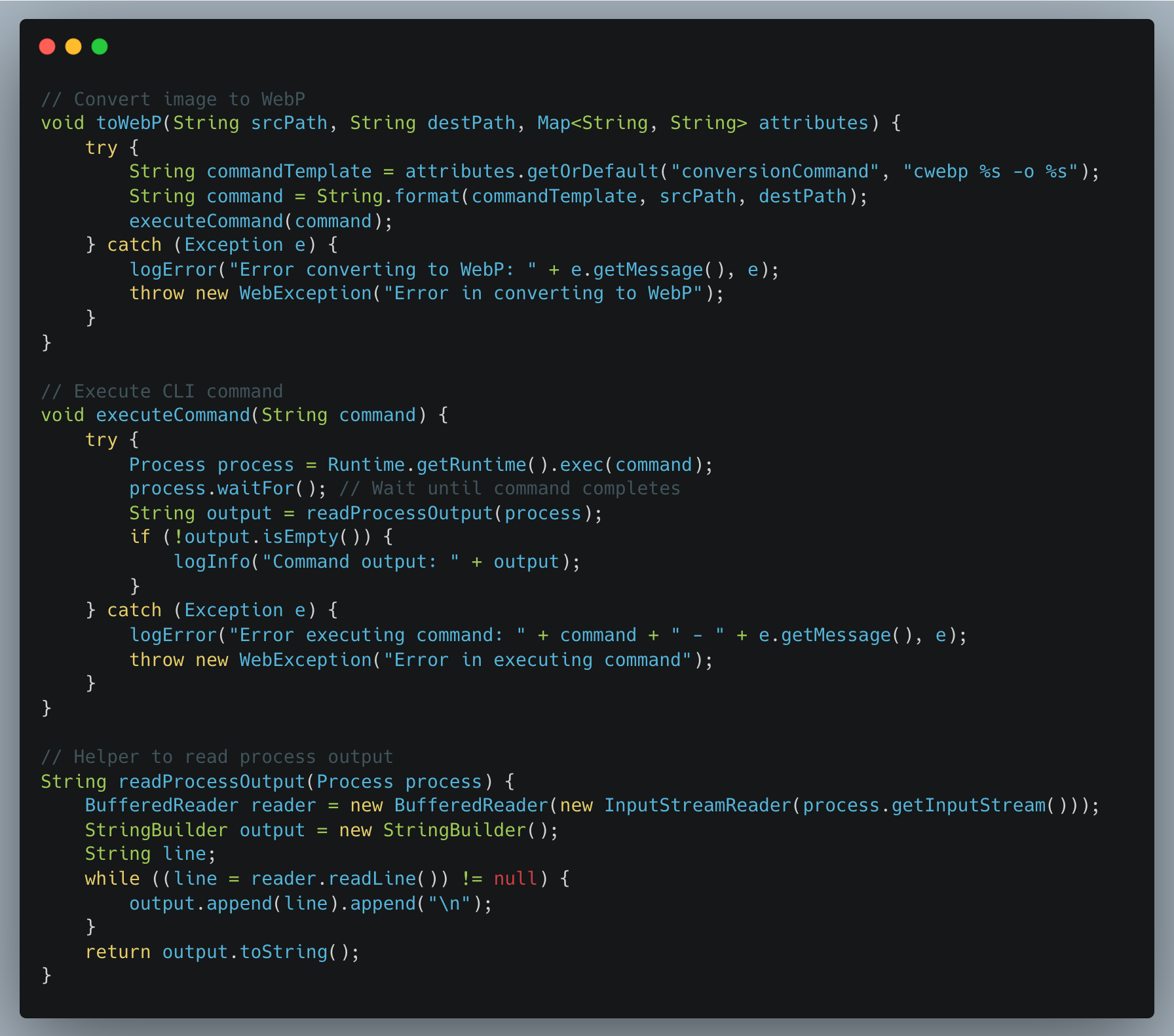
We integrated Google’s cwebp CLI in our file upload service. When a file is uploaded, the service:
- Invokes
cwebpsynchronously for image files usingProcessBuilder - Waits for the process to complete
- Uploads the converted
.webpfile to S3
WebP Conversion Optimization Discovery
While reviewing cwebp conversion, we found two parameters that can be fine-tuned for better performance:
| Flag | Description | Effect |
|---|---|---|
-mt |
Enables multithreading | Utilizes all CPU cores for block encoding |
-m 0 |
Sets compression method to 0 (fastest) | Prioritizes speed over minimal size gain |
How It Works
With -mt, cwebp splits the image into macroblocks and compresses them in parallel threads.
This allows cwebp to fully utilize all CPU cores instead of a single thread, drastically improving throughput.
The default mode (-m 4) represents a balanced trade-off between encoding speed and compression efficiency. For our documents where minor quality differences aren't visually significant, we didn't need this balance.
With (-m 0), we shift heavily toward speed: it uses simpler encoding decisions and skips advanced compression passes (like trellis quantization and enhanced filtering) that marginally improve file size but significantly increase encoding time. For document uploads where users are waiting, speed matters more than saving an extra 2-3% on file size.
So we ran a few experiments using the same input set (1 MB – 100 MB PNGs) with and without these command changes, and the effect was massive.
WebP Conversion Performance: Default CLI vs Optimized CLI
| File Size | Default CLI | Optimized CLI (-mt -m 0) |
Improvement |
|---|---|---|---|
| 1 MB | 133 ms | 39 ms | 70.7% faster |
| 10 MB | 542 ms | 223 ms | 58.9% faster |
| 50 MB | 2714 ms | 1045 ms | 61.5% faster |
| 100 MB | 13.5 s | 2.0 s | 84.9% faster |
Optimized CLI delivered 60–95% faster conversion, with negligible changes in output size.
Note: Benchmarks were conducted on production-grade AWS EC2 instances with multi-core CPUs. The -mt flag’s effectiveness scales with available CPU cores, so actual improvements may vary depending on hardware.
2. S3 Multipart Upload — Handling Large Files Efficiently
After optimizing WebP conversion, our next focus was on improving uploads of large files to S3. Big files could cause latency spikes and block server threads when uploaded synchronously.
How We Implemented Multipart Upload
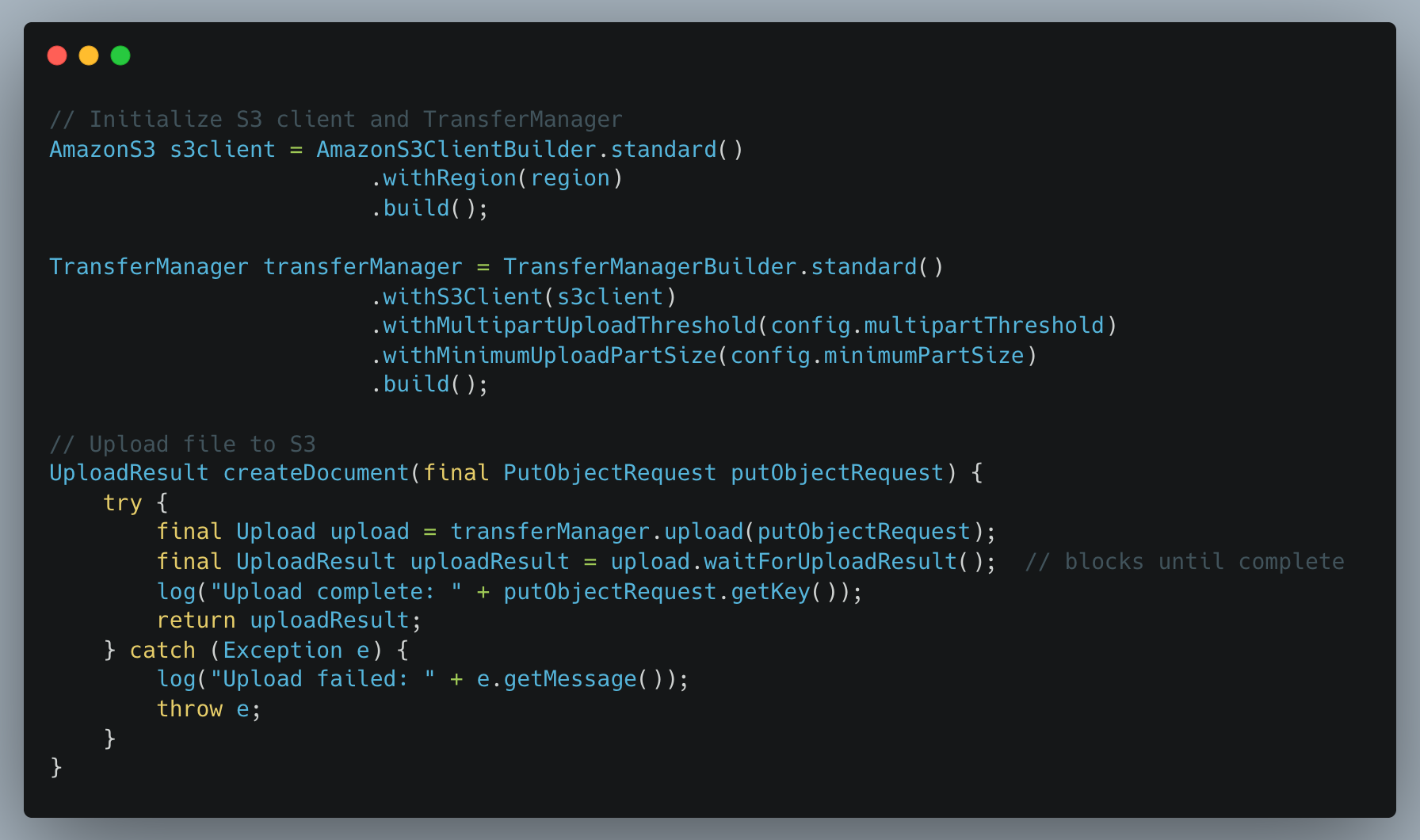
AWS SDK’s TransferManager automatically handles multipart uploads for files above a configured threshold. It splits files into parts, uploads them concurrently using multiple threads, retries failed parts automatically, and combines all parts into a single S3 object. This improves throughput, reduces memory usage, and simplifies retry logic.
Why This Approach Improves Performance
- Parallelism: Multiple parts upload concurrently, increasing throughput.
- Memory Efficiency: Files are streamed in parts, so large files don’t consume excessive memory.
- Automatic Retry: Only failed parts are retried; successful parts are not re-uploaded.
- Simplicity: No need to manually manage file splits, threads, or retry logic — TransferManager handles it.
Performance Comparison: S3 Multipart vs Traditional Uploads
We benchmarked single-part and multipart S3 uploads across PDF files from 5 MB to 100 MB. The findings were consistent:
- Small files (5–20 MB):
Multipart sometimes performed similarly or slightly slower due to coordination overhead — expected for smaller payloads. - Large files (50–100 MB):
Multipart uploads delivered stable gains, typically 20–58% faster, with added benefits like automatic retries, better resilience, and lower memory pressure. - Why do we use multipart above 20 MB:
Even when raw speed improvements are modest, multipart prevents full-file retries on failures and ensures smoother, more reliable uploads under varying network conditions.
Note: We initially implemented this using AWS SDK v1's TransferManager and have since migrated to AWS SDK v2's S3TransferManager. Both versions provide similar multipart upload capabilities. The core concepts discussed here apply to both versions.
3. Presigned URL Upload — Asynchronous, Scalable File Uploads
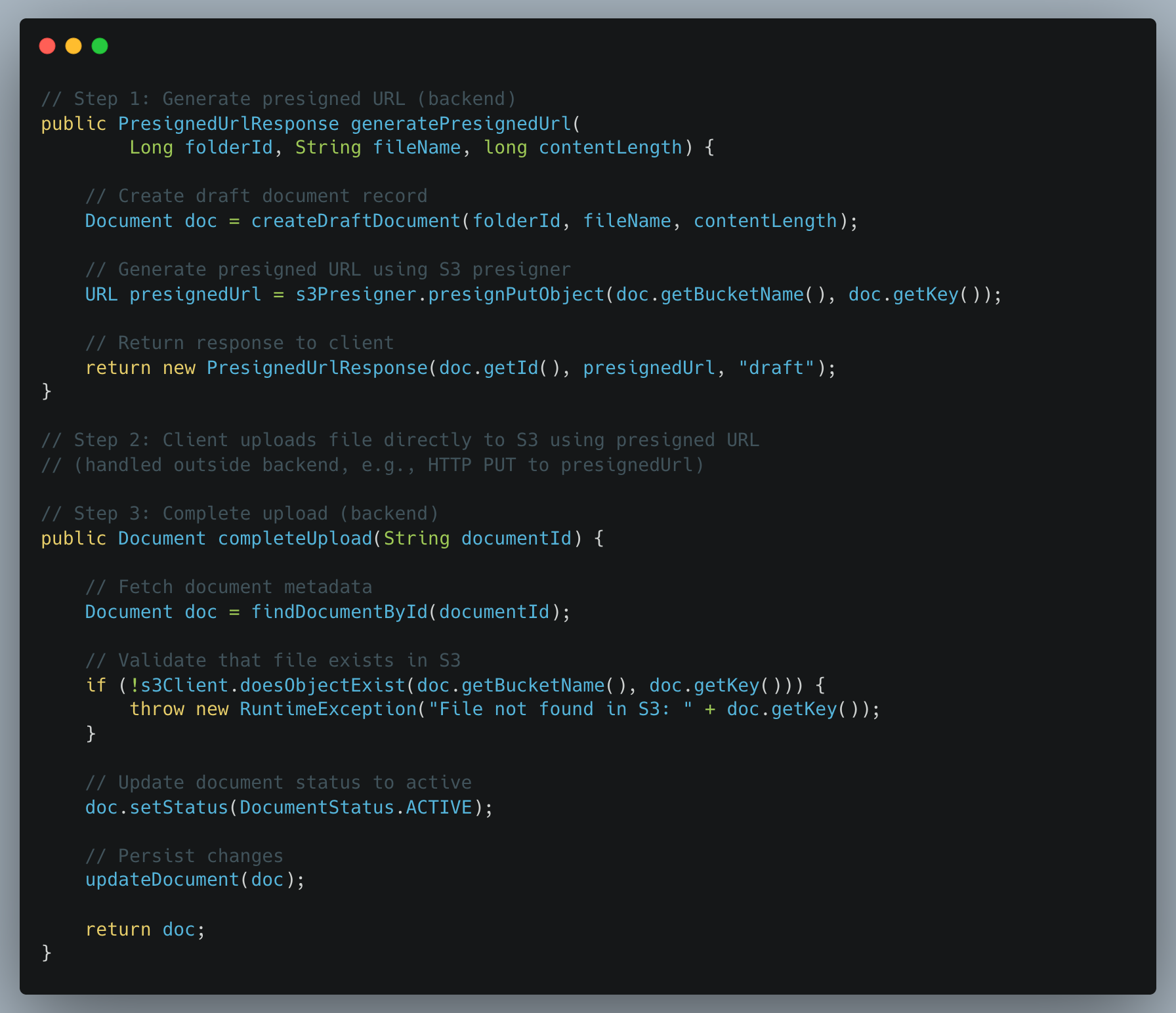
To remove backend bottlenecks altogether, we introduced presigned URL uploads, allowing clients to upload directly to S3 while the backend only handles metadata.
How It Works
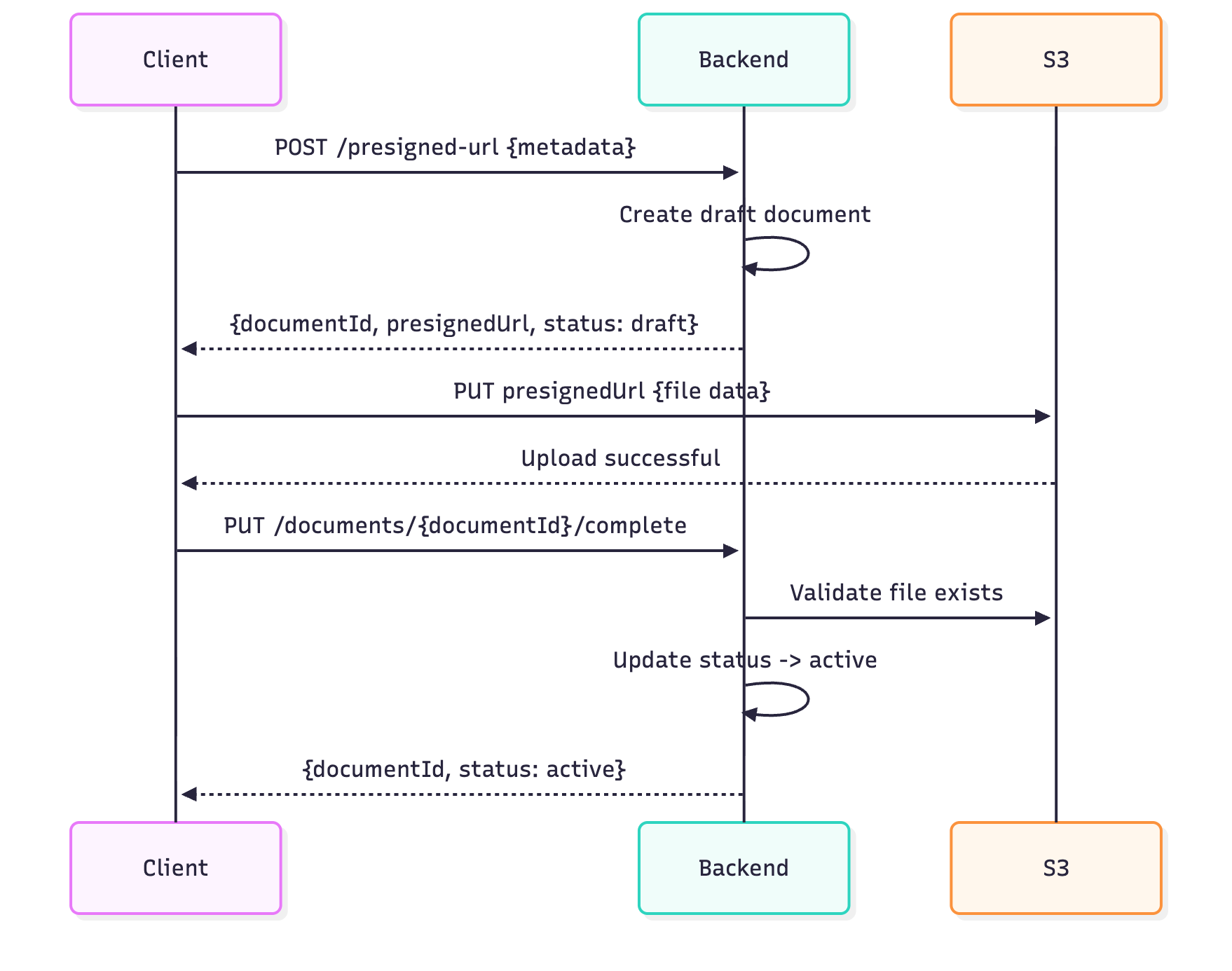
- Client Requests Presigned URL
Client requests a presigned URL. The backend generates a URL that allows the client to upload directly to S3. - Client Uploads File Directly to S3
Using the presigned URL, the client uploads the file. This step bypasses the backend, reducing memory and CPU usage. - Backend Marks Upload Complete
The client calls to update the status of the upload completion. Backend verifies the file and marks the document toactive.
Security Best Practices for Presigned URLs
To ensure presigned URLs remain secure and tamper-proof, we implemented three safeguards:
- Short Expiration Windows: Presigned URLs expire within a configurable timeframe tailored to each use case, limiting the window for unauthorized use while ensuring legitimate uploads complete successfully.
- File Integrity Verification: A checksum is computed on the client side during presigned URL generation and verified by S3 during upload. This ensures the file isn’t corrupted or tampered with during transmission.
- Post-Upload Status Check: After the upload completes, the backend validates that the file exists in S3 and matches the expected metadata before marking the document as active. This prevents incomplete or failed uploads from being treated as successful and ensures a consistent system state.
Benefits of Presigned URL Upload
- Async & Non-blocking: Backend does not stream the file, reducing memory and CPU load.
- Scalable: Clients handle the upload directly; backend only manages metadata.
- Resilient: Upload retries and network fluctuations are handled by the client-S3 interaction.
This approach complements synchronous multipart uploads: large files that require backend processing can still use multipart upload, while presigned URLs support fully decoupled, asynchronous workflows.
Summary — A Faster, Smarter Upload Experience
At Halodoc, our document upload system had to evolve to keep pace with growing usage and larger files. Here’s how we transformed it:
- Smarter Images: WebP conversion with multithreading made image uploads faster and lighter — smaller files without losing quality.
- Seamless Large File Handling: Multipart uploads let us stream big files efficiently, upload parts in parallel, and automatically retry failed chunks.
- Async, Scalable Uploads: Presigned URLs empower clients to upload directly to S3, reducing backend load while maintaining control and reliability.
Making a Difference for Healthcare
For Patients:
Faster uploads of medical reports mean quicker diagnoses, follow-ups, and care decisions.
For Doctors & Hospitals:
Reliable uploads reduce rework, prevent delays, and build trust in digital workflows.
Business Wins:
- Lower infrastructure costs through more efficient data transfer
- Fewer upload failures → higher user satisfaction and fewer support tickets
Join Us
Scalability, reliability and maintainability are the three pillars that govern what we build at Halodoc Tech. We are actively looking for engineers at all levels, and if solving hard problems with challenging requirements is your forte, please reach out to us with your resumé at careers.india@halodoc.com.
About Halodoc
Halodoc is the number one all-around healthcare application in Indonesia. Our mission is to simplify and deliver quality healthcare across Indonesia, from Sabang to Merauke.
Since 2016, Halodoc has been improving health literacy in Indonesia by providing user-friendly healthcare communication, education, and information (KIE). In parallel, our ecosystem has expanded to offer a range of services that facilitate convenient access to healthcare, starting with Homecare by Halodoc as a preventive care feature that allows users to conduct health tests privately and securely from the comfort of their homes; My Insurance, which allows users to access the benefits of cashless outpatient services more seamlessly; Chat with Doctor, which allows users to consult with over 20,000 licensed physicians via chat, video or voice call; and Health Store features that allow users to purchase medicines, supplements and various health products from our network of over 4,900 trusted partner pharmacies. To deliver holistic health solutions in a fully digital way, Halodoc offers Digital Clinic services, including Haloskin, a trusted dermatology care platform guided by experienced dermatologists.
We are proud to be trusted by global and regional investors, including the Bill & Melinda Gates Foundation, Singtel, UOB Ventures, Allianz, GoJek, Astra, Temasek, and many more. With over USD 100 million raised to date, including our recent Series D, our team is committed to building the best personalised healthcare solutions, and we remain steadfast in our journey to simplify healthcare for all Indonesians.