Migrating Apps to Android 16: Our Journey at Halodoc
At Halodoc, we believe every user deserves a consistent, high-quality healthcare experience — regardless of the Android version they're running.
Android 16 (API level 36), internally codenamed "Baklava," was released on June 10, 2025 — marking the earliest stable release of any major Android version to date. According to Google's platform distribution data (December 2025), Android 16 had already reached 7.5% adoption within just six months of release — outpacing Android 15's 4.5% at the same stage. With accelerated OEM rollouts, adoption has continued to climb rapidly in 2026, making it one of the fastest-adopted Android versions in history. As per the Android Developers Blog, Google Play will require all app updates to target API 36 starting August 2026. Proactive migration isn't just best practice — it's a necessity.
Unlike previous version bumps, Android 16 enforces several breaking changes that cannot simply be deferred with an opt-out flag. From mandatory edge-to-edge rendering and predictive back navigation to adaptive layout enforcement on large screens, this release sets a new baseline for modern Android apps.
In this post, we'll walk through how we addressed the Android 16 platform changes, the challenges we encountered, and how we ensured a smooth transition without compromising the user experience.
What's New in Android 16 and Why It Matters
Before diving into the migration process, it's important to understand what Android 16 brings to the table and why Google is introducing these changes. Android 16 builds upon the platform's goals of improving UI adaptability, strengthening security, and enforcing modern UX patterns across all device types.
Some of the key changes in Android 16 include:
- Edge-to-Edge Enforcement (No Opt-Out): The
windowOptOutEdgeToEdgeEnforcementflag introduced in Android 15 is now completely ignored. All apps targeting API 36 must render edge-to-edge. - Mandatory Predictive Back Navigation:
onBackPressed()is no longer called andKeyEvent.KEYCODE_BACKis no longer dispatched. Apps must use theOnBackInvokedCallbacksystem. - Adaptive Layout Enforcement on Large Screens: Orientation, resizability, and aspect ratio restrictions are ignored on displays with smallest width ≥ 600dp (tablets, foldables, Chromebooks).
- Foreground Service Compliance: FGS must have precise types and user-visible purpose, with stricter start rules and timeout handling.
- 16 KB Page Size Compliance: All apps and updates targeting Android 15+ must support 16 KB memory page sizes on 64-bit devices.
- Stronger Intent Security: Android 16 introduces enhanced protections against intent redirection attacks with a new Safer Intents feature.
- Permission Revocation for Unused Apps: Android can auto-revoke runtime permissions after long inactivity, requiring apps to detect and re-request gracefully.
Updating to Android 16
Our first step was to update the targetSdkVersion and compileSdkVersion to 36 across all modules. Targeting 36 turns on stricter runtime behaviours, so we also had to upgrade the entire build toolchain to ensure compatibility.
We upgraded our toolchain to the following versions:
- AGP: 8.11.0
- Gradle: 8.13
- Kotlin: 2.2.0
- Android Studio: Narwhal 3 Feature Drop (2025.1.3)
- JDK: 17
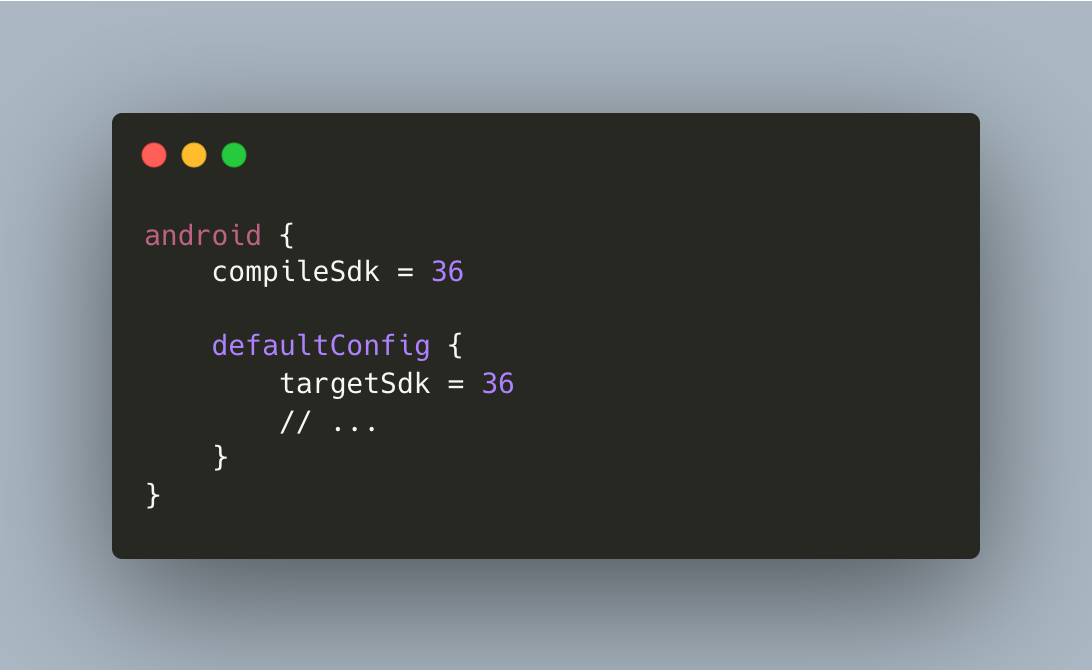
Once these changes were made, we updated all critical third-party SDKs — to versions that support API 36. We then re-ran R8/ProGuard shrinking and addressed new warnings and errors that surfaced.
What can go wrong if you skip this: Play Console can block updates for out-of-date target SDKs. Builds can fail if AGP/Gradle/Kotlin are incompatible. Third-party SDKs using removed or deprecated APIs may cause runtime crashes.
Edge-to-Edge Enforcement
One of the most impactful changes carried forward from Android 15 — and now fully enforced in Android 16 — is the removal of the edge-to-edge opt-out.
In Android 15, apps could temporarily disable edge-to-edge enforcement using:
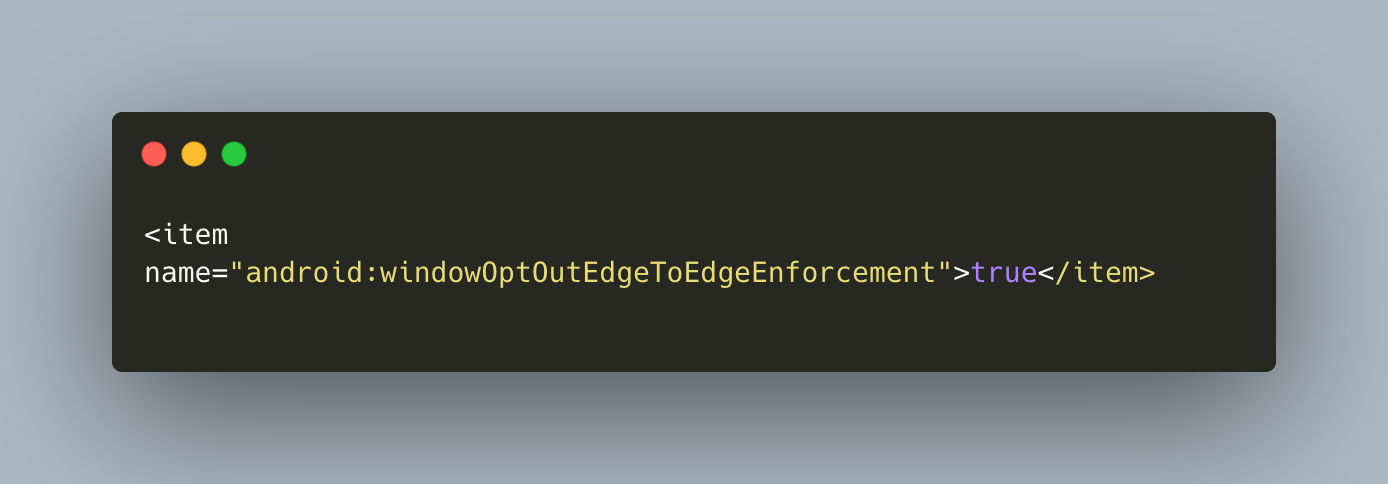
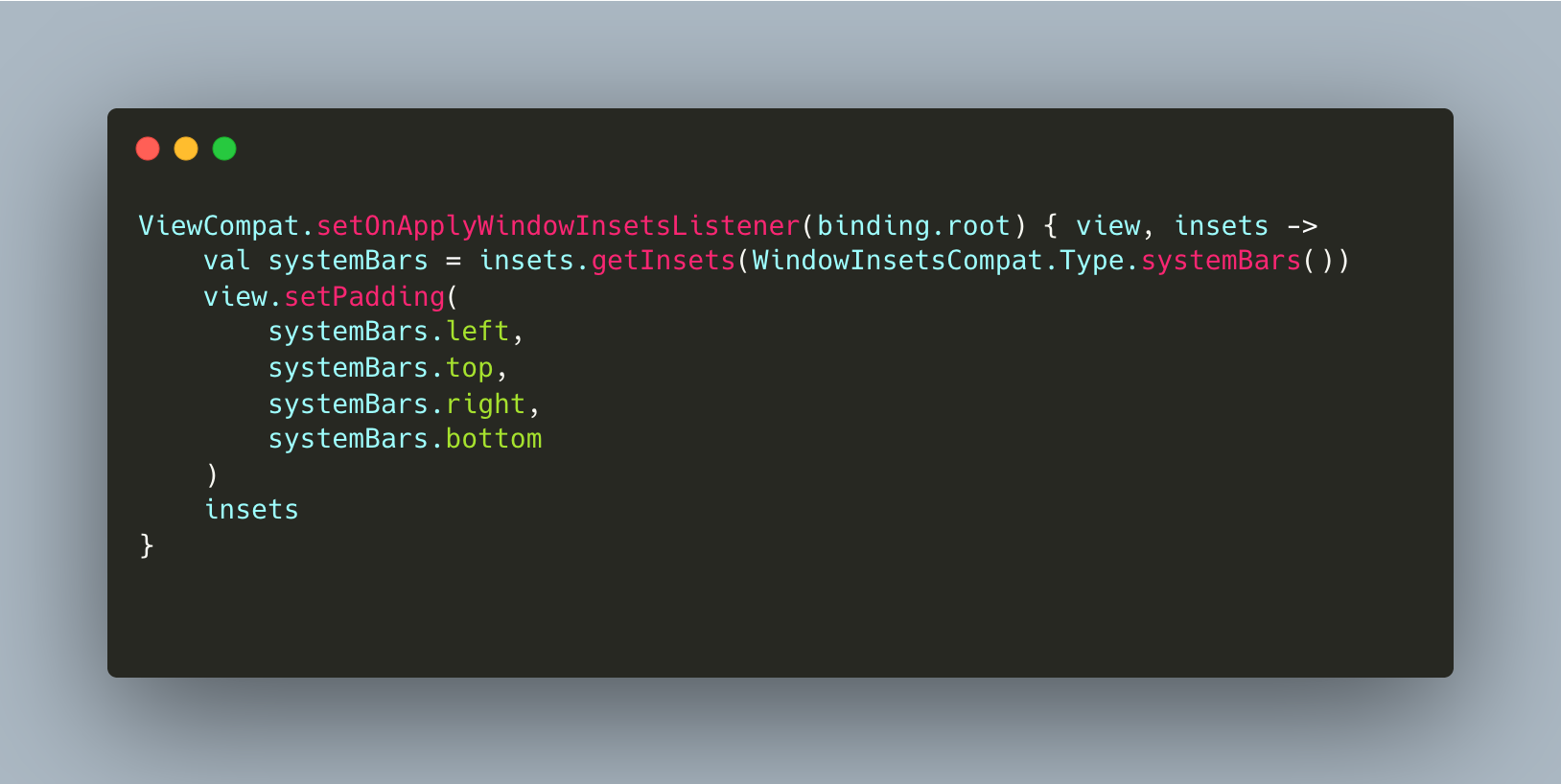
Starting with Android 16, this flag is completely ignored. Apps targeting API 36 must draw content behind the system status and navigation bars, and handle insets properly. System bars will overlap your content unless you explicitly apply insets.
We audited every screen in our app for hidden UI under status bars, navigation bars, and display cutouts. For activities still using XML layouts, we applied system bar insets as padding on the root layout:
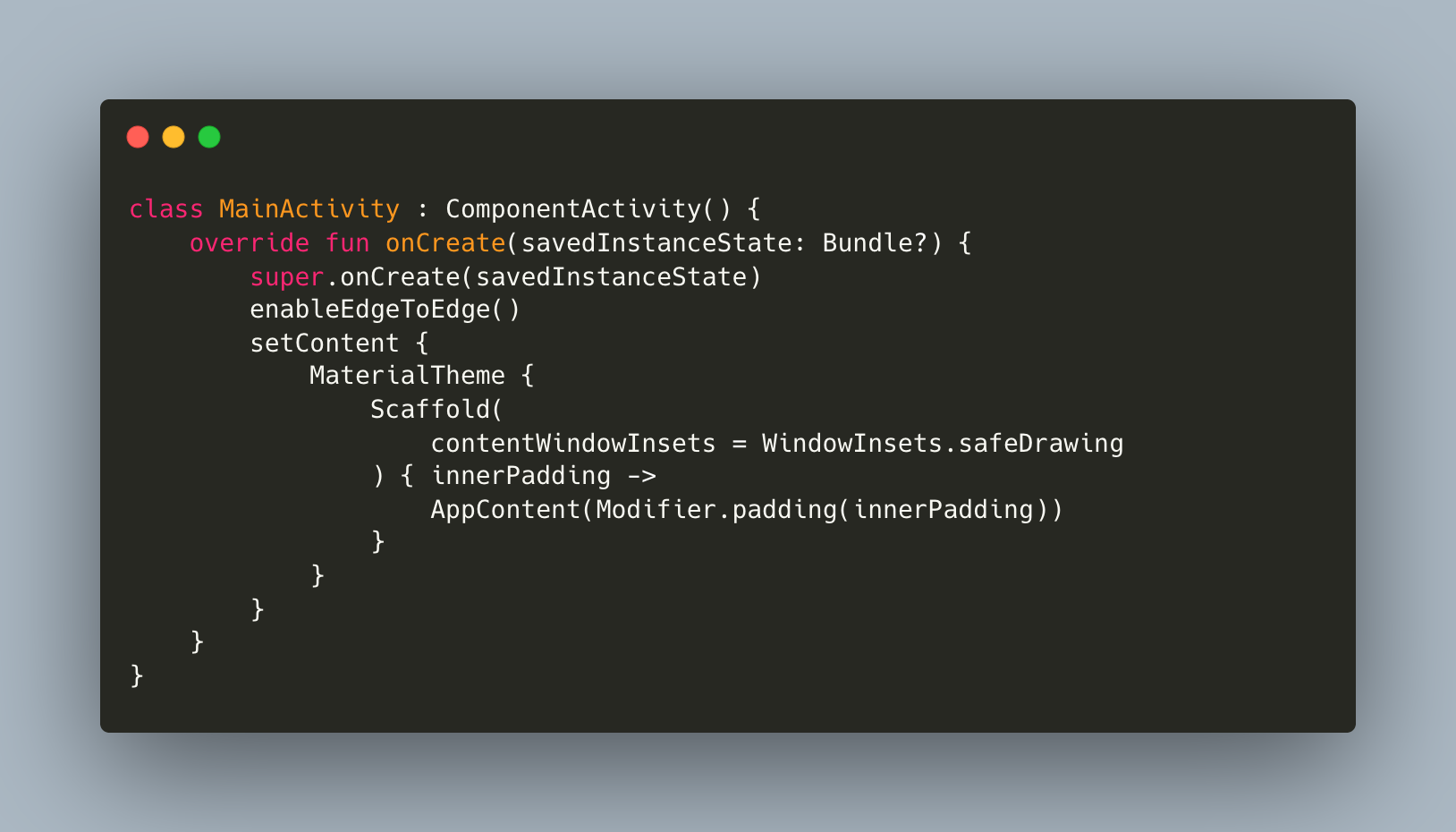
For our Jetpack Compose screens, we ensured proper inset handling within Scaffold:
How We Tested
- Toggled between gesture navigation and 3-button nav to verify inset handling in both modes.
- Rotated the device and tested on cutout devices.
- Verified that bottom sheets, snackbars, and dialogs properly respect insets.
What can go wrong if you skip this: Critical buttons and text can be obscured behind system bars, causing usability issues and support escalations. Visual regressions lead to poor ratings and accessibility violations.
Predictive Back Navigation
Predictive back was introduced in Android 13, but Android 16 makes it mandatory. This is effectively the death of onBackPressed().
Here's what happens when you target API 36:
- The predictive back system animations (back-to-home, cross-task, and cross-activity) are enabled by default.
onBackPressed()is no longer called.KeyEvent.KEYCODE_BACKis no longer dispatched.
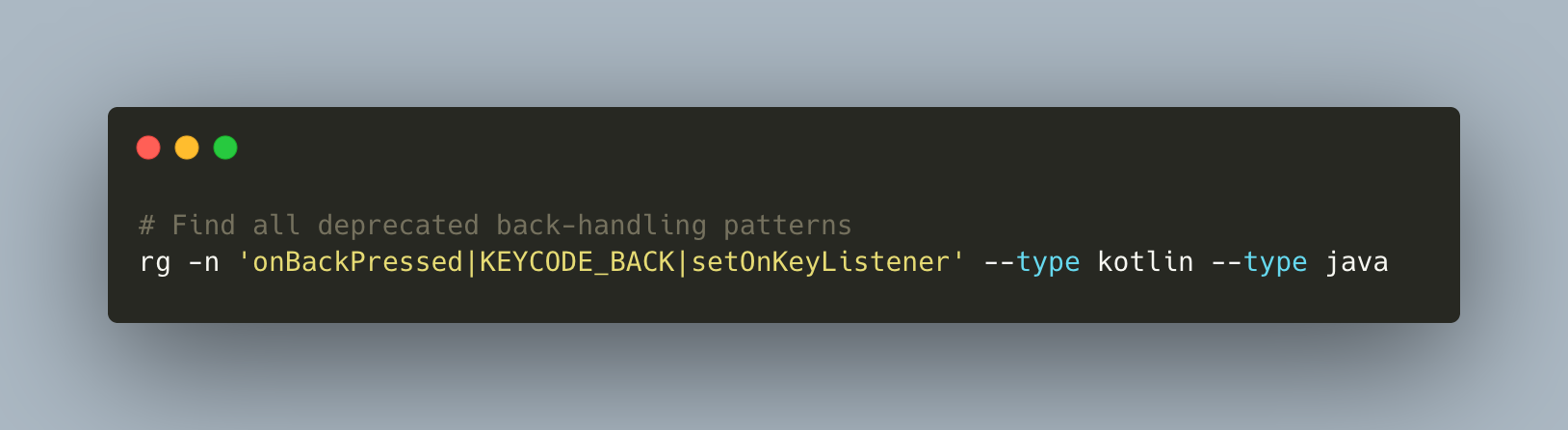
This means apps with custom back-handling logic — web views, forms, nested navigation, modal bottom sheets — must migrate to the newer callback-based system. We searched our entire codebase for usages that needed updating:
We then replaced all instances with the OnBackPressedDispatcher / callback model:
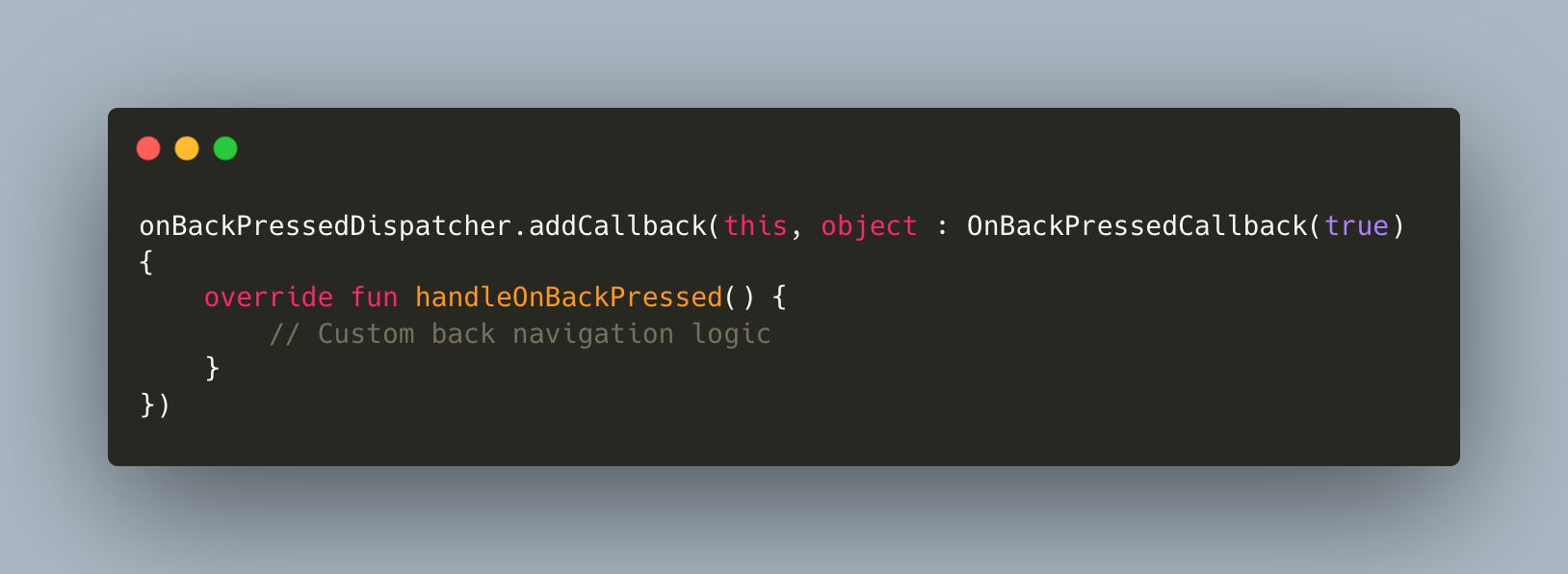
Note: OnBackInvokedCallback is the platform API (available from API 33+) and is used when working directly with the framework. OnBackPressedDispatcher (from AndroidX Activity library) wraps this for backward compatibility and is the recommended approach for most apps using AppCompat or Jetpack. At Halodoc, we primarily used OnBackPressedDispatcher since our activities extend AppCompatActivity."
Large Screen Adaptive Layouts
This is perhaps Android 16's most controversial — and most impactful — change. For apps targeting API 36, the following manifest attributes and runtime APIs are completely ignored on displays with smallest width ≥ 600dp (tablets, foldables, desktop windows):
screenOrientation(portrait, reversePortrait, sensorPortrait, userPortrait, landscape, reverseLandscape, sensorLandscape, userLandscape)resizableActivityminAspectRatio/maxAspectRatiosetRequestedOrientation()/getRequestedOrientation()
Apps must fill the entire display window in both portrait and landscape orientations, adapting dynamically to different form factors.
How We Adopted
- Added size-class aware layouts (e.g.,
sw600dpresources, Compose adaptive patterns usingWindowSizeClass). - Removed fixed orientation assumptions (
android:screenOrientation="portrait") in code and manifests. - Added
android:resizeableActivity="true"explicitly where missing. - Tested multi-window resizing, foldable postures, and external display scenarios.
How We Tested
- Resized windows in emulator; verified state preservation and proper recomposition across configuration changes.
- Validated landscape/portrait transitions and split-screen behaviour.
- Ran multi-window and foldable test plans across key flows — consultations, chat, and payments.
What can go wrong if you skip this: UI can break on tablets and foldables; functionality may become inaccessible. Desktop windowing users will experience broken layouts, hurting productivity. Note that the opt-out will be removed entirely for apps targeting API 37, so this migration is unavoidable.
Foreground Service Compliance
Android 16 continues tightening the rules around foreground services. FGS must have precise types and a user-visible purpose, with stricter start rules. Overlong runs can now timeout.
At Halodoc, several flows depend on foreground services — particularly for prescription uploads in the Pharmacy module and ongoing call sessions in Tele-consultation.
How We Adopted
- Inventoried all services and declared correct
foregroundServiceTypevalues (e.g.,phonecall,mediaPlayback,dataSync,mediaUpload). - Migrated deferrable and background work to
WorkManager/JobScheduler. - Gated FGS starts behind user actions and ongoing UI, and implemented
onTimeouthandling to prevent orphaned services. - Added telemetry to confirm no orphaned FGS persists after a flow ends.
How We Tested
- Simulated background starts; verified notifications and lifecycle (start/stop) correctness.
- Ran end-to-end call and chat sessions; verified battery and ANR metrics remained healthy.
What can go wrong if you skip this: Blocked FGS starts can cause missed operations (e.g., call setup failures). Play review may flag misuse. Users see persistent notifications without clear purpose.
16 KB Page Size Compatibility
Starting November 1, 2025, all new apps and updates targeting Android 15+ must support 16 KB memory page sizes on 64-bit devices. Android 16 adds a backward-compatibility mode for apps still using 4 KB aligned pages, but Google recommends migrating fully for best performance.
This change primarily affects apps that ship native code (.so files). Pure Kotlin/Java apps are already compatible.
Intent Redirection Protections
Android 16 introduces stricter intent matching and safer defaults to reduce abuse. The key change is stricter android:exported enforcement — components with intent filters must explicitly declare android:exported="true" or android:exported="false", and explicit intents must now match the target component's intent filter. Implicit or loosely targeted intents can fail or be blocked.
How We Adopted
- Set explicit actions, packages, and component classes on all intents where appropriate, and validated extras.
- Verified
android:exportedis correctly declared on all components. - Enabled verbose logging for intent resolution in staging and fixed mismatches.
How We Tested
- Tested deep links, share intents, and broadcast flows across API 26 through 36.
Permission Revocation for Unused Apps
Android can auto-revoke runtime permissions from apps that haven't been used in months. This means returning users may find features disabled until consent is re-granted — a particularly critical concern for a healthcare app like Halodoc.
How We Tested
- Tested denial and re-grant sequences; confirmed stable UI state transitions.
- Verified telemetry for permission states and updated support guides for re-granting.
Challenges We Hit Along the Way
- Edge-to-edge enforcement broke custom toolbars, sticky CTAs, and floating buttons that relied on inconsistent
fitsSystemWindowsusage across screens. - Screens designed for phone screens broke on larger displays (≥600dp) once orientation and resize restrictions were ignored.
- Activities that never rotated before started losing state on recreation — exposing gaps in ViewModel and
SavedStateHandlecoverage.
Testing Strategy
A thorough testing strategy was crucial for a smooth migration. Here's what we followed:
- Tested on real Android 16 devices — both standard and 16 KB page size configurations
- Ran full regression on edge-to-edge rendering, predictive back, and orientation changes across all major user flows.
- Tested on large-screen real devices — Pixel Tablet, Pixel Fold, and desktop windowing mode.
- Validated all third-party SDKs for compatibility with API 36.
- Ran automation tests across API 26, 30, 33, and 36 to catch behavioural diffs.
- Validated Play rollout results — no startup crashes, no security or policy violations.
Rollout Strategy: Phased Migration
We adopted a phased rollout strategy to minimize risk:
- Phase 1 — Internal & Staging: Merged the targetSdk 36 bump into staging builds. Dev and QA ran full regression on real devices across API 26, 30, 33, and 36.
- Phase 2 — Staged Production Rollout: Rolled out to 1% → 2% → 5% → 10% → 20% → 50% → 100% of production users over a week, monitoring vitals at each stage.
- Phase 3 — Post-Rollout Monitoring: Continued monitoring for two weeks post-100% rollout — tracking crash-free startup rate, permission grant rates, and support ticket volume for any regressions.
This phased approach allowed us to catch and address edge cases at each stage before they could impact a wider user base.
Conclusion
In this article, we've shared our key experiences and learnings from migrating our apps to Android 16. Android 16 represents a significant shift toward adaptive, responsive apps that work seamlessly across phones and tablets. While some of these changes required rethinking legacy implementations, they ultimately create a more consistent and secure experience for our users.
References
- Migrate apps to Android 16
- Behaviour changes for apps targeting Android 16
- Behaviour changes for all apps on Android 16
- Android 16 features and changes summary
- Support 16 KB page sizes
- Orientation and resizability changes in Android 16
Join Us
Scalability, reliability, and maintainability are the three pillars that govern what we build at Halodoc Tech. We are actively looking for engineers at all levels and if solving hard problems with challenging requirements is your forte, please reach out to us with your resumé at careers.india@halodoc.com.
About Halodoc
Halodoc is the number one all-around healthcare application in Indonesia. Our mission is to simplify and deliver quality healthcare across Indonesia, from Sabang to Merauke. Since 2016, Halodoc has been improving health literacy in Indonesia by providing user-friendly healthcare communication, education, and information (KIE). In parallel, our ecosystem has expanded to offer a range of services that facilitate convenient access to healthcare, starting with Homecare by Halodoc as a preventive care feature that allows users to conduct health tests privately and securely from the comfort of their homes; My Insurance, which allows users to access the benefits of cashless outpatient services in a more seamless way; Chat with Doctor, which allows users to consult with over 20,000 licensed physicians via chat, video or voice call; and Health Store features that allow users to purchase medicines, supplements and various health products from our network of over 4,900 trusted partner pharmacies. To deliver holistic health solutions in a fully digital way, Halodoc offers Digital Clinic services including Haloskin, a trusted dermatology care platform guided by experienced dermatologists.We are proud to be trusted by global and regional investors, including the Bill & Melinda Gates Foundation, Singtel, UOB Ventures, Allianz, GoJek, Astra, Temasek, and many more. With over USD 100 million raised to date, including our recent Series D, our team is committed to building the best personalized healthcare solutions — and we remain steadfast in our journey to simplify healthcare for all Indonesians.